Ubersuggest pricing: monthly, yearly or lifetime, the right math
Ubersuggest pricing, the short answer: $29, $49 or $99 a month, $192, $326 or $657 a year, or one payment of $290, $490 or $990 for lifetime access, per its US-dollar price list read October 30, 2026. The free plan stays at $0 with 3 searches a day. If you'll stay seven months or more, yearly beats monthly; lifetime beats yearly in the second year, as long as on-demand AI is enough for you.
 By Jérémy Santos Updated on October 30, 2026 Tested on his own SemChat account: first audit on October 29, 2026.
 This page is part of the guide: Ubersuggest alternatives
Ubersuggest pricing plans as of October 29, 2026
I’m Jérémy Santos, and I write this site. Before the numbers, two things you should know.
First, I haven’t tested Ubersuggest on a paid account. Everything below comes from its official pages and help articles, each with the date I read it. The only tool I tested on a real account for this site is SemChat, on October 29, 2026; that test is in the SemChat review.
Second, SemChat links on this page are affiliate links. If you subscribe through one, I earn a commission at no extra cost to you. Ubersuggest links are plain: its help center says its affiliate program “isn’t active” (May 5, 2026).
Now, the plans. Ubersuggest’s plain-text price file opens with “prices below are in US Dollars (USD)” (ubersuggest.com/pricing.md, read October 30, 2026):
| Plan | Monthly | Yearly | Lifetime (one payment) |
|---|---|---|---|
| Free | $0 | $0 | none |
| Individual | $29 | $192 | $290 |
| Business | $49 | $326 | $490 |
| Enterprise/Agency | $99 | $657 | $990 |
Yearly per month, worked out from those totals: $16 for Individual ($192 / 12), $27.17 for Business ($326 / 12) and $54.75 for Enterprise/Agency ($657 / 12).
One catch on currency. The same file says Ubersuggest uses localized pricing based on the visitor’s region. From France, the live pricing page showed the same numbers in euros: €29, €192 and €290 for Individual, for example (pricing data read October 29, 2026). So the figure you see depends on where you are.
Data missing: the price a visitor in the United States sees on the live page (planned source: ubersuggest.com/en/pricing reread from the United States before publication).
Ubersuggest’s help explains how this works: prices are set by your IP address, in several local currencies, and the currency is locked once you buy (help, May 24, 2025). So if you travel, don’t be surprised by a different symbol. And if you’ve already paid, your price stays in the currency you paid in.
You can pay by Visa, MasterCard, American Express, Discover, JCB, UnionPay or PayPal, and ask for an invoice in your company’s name at [email protected] (pricing page FAQ, October 29, 2026).
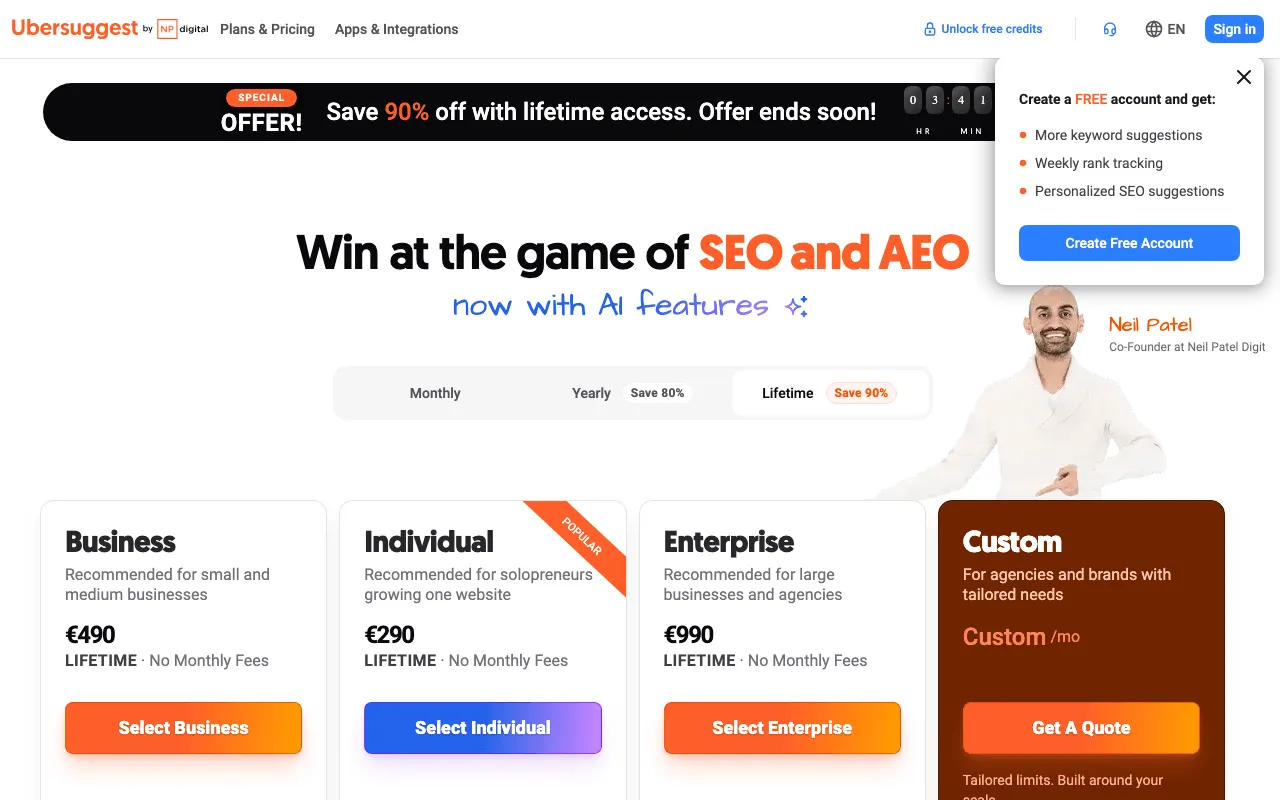
Ubersuggest’s pricing page, with its free plan and its paid plans, seen from France (prices in euros, lifetime tab selected). Screenshot of https://ubersuggest.com/en/pricing, taken on October 30, 2026.
The English page also shows a fourth card, Custom, “For agencies and brands with tailored needs”, priced on quote (same screenshot).
Individual, Business and Enterprise/Agency: what each plan covers
The price file sums up each plan in one line: “Managing 1 website.” for Individual, “Managing 2-7 websites” for Business, “Managing 8-15 websites” for Enterprise/Agency. The English page labels them “Recommended for solopreneurs growing one website”, “Recommended for small and medium businesses” and “Recommended for large businesses and agencies” (screenshot of October 30, 2026).
Here’s what each monthly or yearly plan includes, per pricing.md and the pricing page:
| What you get | Individual | Business | Enterprise/Agency |
|---|---|---|---|
| Users | 1 | 2 | 5 |
| Projects | 1 | 7 | 15 |
| Searches a day | 150 | 300 | 900 |
| Credits a month | 250 | 500 | 1,000 |
| AI prompt ideas per search | 25 | 50 | 75 |
| AI prompts tracked per project | 10, monthly | 15, every two weeks | 20, weekly |
| Site audit, pages per project | 1,000 | 5,000 | 10,000 |
| Tracked keywords per project | 125 | 150 | 300 |
| Competitors | 5 | 10 | 15 |
| Locations | 20 | unlimited | unlimited |
| Bulk keyword analysis | 50 | 200 | 1,000 |
| Backlinks shown | 2,000 | 5,000 | 10,000 |
| Exports | images, CSV, PDF | images, CSV, PDF | images, CSV, PDF |
Read the table by your bottleneck. One website and fewer than 150 lookups a day: Individual. A second site or a colleague: Business is the first plan with 2 users and more than 1 project.
Email support comes with all three paid plans (pricing page).
What do you gain by leaving the free account for Individual? Here’s the jump, line by line (help article updated July 26, 2025, and pricing.md):
| Free | Individual | |
|---|---|---|
| Searches or reports a day | 3 | 150 |
| Projects | 1 | 1 |
| Tracked keywords | 25, weekly, desktop | 125 per project |
| Competitors | 2 | 5 |
| Locations | 1 | 20 |
| Site audit | 150 pages a week, no recrawl | 1,000 pages per project |
| Backlinks shown | 100 per site | 2,000 |
| Chrome extension searches a day | 40 | 100 |
| AI Chat | not stated | ticked |
Notice the projects line: Individual still means one website. You pay for depth, not for a second site.
Monthly or yearly billing: what you commit to
Monthly is the only billing with a “7-day free trial” (pricing.md). Yearly and lifetime have none, per the terms.
Yearly is a big cut. Twelve months of Individual at $29 cost $348; the yearly plan is $192. That’s $156 saved, or 45% less. The page’s toggle says “Save 80%” on yearly (screenshot of October 30, 2026), but the plan’s own prices give 45% for Individual. Trust the math, not the badge.
When does yearly pay off? $192 divided by $29 is 6.6. So if you keep Ubersuggest seven months or more, yearly costs less than monthly. The same seven-month rule holds for Business ($326 / $49) and Enterprise/Agency ($657 / $99).
The flip side of yearly: you pay up front, and after the trial window there’s no refund (see below). If you’re not sure you’ll use it past the summer, start monthly, use the 7-day trial, and switch once you know.
The Ubersuggest lifetime deal: one payment, with conditions
Pay once and never again. That’s the offer: $290 for Individual, $490 for Business and $990 for Enterprise/Agency (pricing.md, read October 30, 2026). The pricing page even opens on the lifetime tab, with cards that read “LIFETIME · No Monthly Fees” (screenshot of October 30, 2026).
How fast does it pay for itself?
| Plan | Lifetime | Equals monthly for | Equals yearly for |
|---|---|---|---|
| Individual | $290 | 10 months at $29 | 1.5 years at $192 |
| Business | $490 | 10 months at $49 | 1.5 years at $326 |
| Enterprise/Agency | $990 | 10 months at $99 | 1.5 years at $657 |
So lifetime wins if you’ll still use the tool in the second year. Before you pay, three conditions.
It’s final. The pricing FAQ says the lifetime purchase is final and non-refundable. The help article on lifetime plans adds no refund and no downgrade; you can move up a tier by paying the difference (help, September 2, 2026).
“Lifetime” has three definitions. The terms say “for as long as neilpatel.com/ubersuggest exists, at the discretion of Neil Patel Digital”. One help article says “access for 50 years” (August 1, 2025); another says “permanent access” (September 2, 2026). The refund article even mentions an “auto-renewal date” on lifetime invoices (February 15, 2026). None of this means the deal is bad. It means you read it as “as long as the product runs”.
The limits are lower. That’s next.
AI features in the lifetime plan: limited, and billed every month
On lifetime, pricing.md lists AI as “AI prompts on demand only”. Compared with the same plan billed monthly or yearly:
- 10 AI prompt ideas per search instead of 25 on Individual, 50 on Business and 75 on Enterprise/Agency;
- 200 credits a month instead of 250 on Individual; 500 on Business (same as monthly); 700 instead of 1,000 on Enterprise/Agency.
The home page FAQ calls the lifetime AI features deliberately limited. AI search visibility comes in a basic version. To get more, there’s a “Lifetime AI” option and a +25 prompts option, both billed every month, priced by location (help, January 23, 2026).
So “No Monthly Fees” is true for the base plan. It stops being true the day you add AI tracking. Data missing: the monthly price of the Lifetime AI option (planned source: Ubersuggest’s in-app billing, read from the United States).
A limited-time offer to check again before you buy
The English page shows a banner: “Save 90% off with lifetime access. Offer ends soon!”, with a countdown (screenshot of October 30, 2026).
When I read the pricing data on October 29, 2026, a response header gave the offer’s end as that same evening, 20:59 UTC. The next day, the banner and its countdown were back. The help article on lifetime plans says limited-time offers are visible only while they run (September 2, 2026).
What that means for you: don’t buy in a rush because of the clock. Check that the lifetime tab is still there the day you’re ready, and read the limits above first.
Ubersuggest add-ons and credits: what costs extra
The plan price is the floor, not always the bill. Ubersuggest sells add-ons “+5 $US/mois chacun” (each at $5 a month), shown in dollars even on its French pricing page (October 29, 2026):
- 500 more daily searches;
- an extra project, with 125 keywords and 3 competitors;
- 250 more tracked keywords;
- more competitor domains;
- more users;
- 5 more AI prompts;
- 500 more monthly credits.
Then come the AI options. The AI writer has add-ons at an “Approx. Monthly Cost” of $9 (Blogger, 25,000 words), $24 (Business, 100,000 words) and $99 (Shakespeare, 500,000 words), with prices that vary by region (help, November 9, 2025). The AI writer itself gives 2,000 words a month on a free account and 10,000 on a paid one (same article).
Example: you’re on Individual and you add one project and 250 tracked keywords. That’s $29 + $5 + $5 = $39 a month, before tax.
Credits for articles, plagiarism checks and local rankings
Credits are the second meter, next to daily searches. Each paid plan gets a monthly stock: 250, 500 or 1,000. Here’s what spends them (official tool pages, read October 29, 2026):
| Action | Credits |
|---|---|
| One full article from the AI content generator | 100 |
| One plagiarism check | 25 |
| One regenerated image | 15 |
| One local SEO check on the Google Maps grid | 3 to 9, by grid size |
The math on Individual: 250 credits buy 2 articles (200) and 2 plagiarism checks (50). That’s it for the month. Want four articles? Add a 500-credit pack at $5 a month.
The local SEO checker covers a grid of 3×3 to 9×9 points around your business. The page says it’s included in all paid plans (in its French version: “inclus dans tous les forfaits payants”), with a PDF export and no need to connect your Google Business Profile. A 9×9 grid is 81 points: that’s the 9-credit end.
The Ubersuggest free trial and how to cancel your subscription
Card required, monthly plans only, then an automatic charge
The trial lasts 7 days. It’s on monthly plans only, once per account or payment method. The home page FAQ is clear that a bank card is needed to start (October 29, 2026).
What happens at day 7? If you haven’t cancelled, the subscription starts and the first month is charged (help article “Refund Policy”, February 15, 2026).
So set a reminder for day 6 the moment you start. That’s the whole trick.
Data missing: the exact cancellation steps in the app (planned source: Ubersuggest’s help center, which answered 403 when I tried to reread it on October 30, 2026). The pricing page FAQ covers cancellation; support is at [email protected].
Refunds after the trial, and the EU right to cancel
After the trial, the refund policy is short: “Fees are non-refundable.” That applies to monthly and yearly subscriptions. Lifetime is non-refundable too.
There’s one exception in the terms: customers in the European Union keep a legal 14-day right to cancel, with a possible deduction for the service already provided (terms updated May 20, 2024). If you’re in the United States, plan as if there’s no refund after day 7.
And one oddity. An older help article says “there are no special rates or discount codes available” (August 1, 2025), while a newer one offers 20% off monthly plans to students for 12 months and to nonprofits, on proof, not combinable (February 20, 2026). Ask support which one applies before you pay full price.
What a paid Ubersuggest plan unlocks, from the documentation
This part is a review from the documentation, not from use. I’m telling you what Ubersuggest’s pages say each paid feature does, with its limits.
Ubersuggest keyword research and domain analysis
Keywords come with volume, difficulty, CPC and intent, plus autocomplete ideas, related terms, questions, prepositions and comparisons. There are AI prompt ideas too, and bulk analysis of 50 to 1,000 keywords by plan. The home page claims “more than 2.2 billion keywords” (French version, October 29, 2026).
Domain analysis shows estimated organic and paid traffic, keywords by traffic, top pages and keyword gaps against 5 to 15 competitors.
Where the numbers come from: Google’s API, updated monthly, per the help article “How Does Ubersuggest Gather Data?” (August 22, 2025). The help also says some locations are greyed out when data is thin.
How far does that data reach? The home page claims “230+” markets and regions and research in more than 100 languages (French version, October 29, 2026). The help publishes a list of covered countries, France among them, and warns that some locations are greyed out when data is missing (help, January 24, 2025). Check yours in the location menu before you pay. Last month’s traffic estimate can take up to six days to arrive after the monthly update.
For languages, the site itself runs in 9: English, Portuguese, German, Spanish, Italian, French, Dutch, Japanese and Chinese. The AI writer works in 9 languages and generates content in 63 (help, September 12, 2025). The help center is in English only.
So a paid plan buys more lookups on the same base, not a different base. If your market is small, test your own keywords on the free account first: if they come back greyed out, no plan will fix it.
Ubersuggest rank tracking and backlink analysis
Rank tracking covers 125, 150 or 300 keywords per project, mobile included, with pixel-position tracking. How often it updates depends on which page you read: the home page says daily, the pricing page says weekly (both October 29, 2026). That’s a question for support before you buy, if daily matters to you.
AI search visibility sits in the same family. Paid plans track AI prompts per project: 10 a month on Individual, 15 every two weeks on Business, 20 a week on Enterprise/Agency (pricing.md). You get a visibility score, share of voice, the full answer to each prompt and sentiment by engine. The home page FAQ names ChatGPT and Gemini on paid plans, plus Google AI Overviews on Enterprise.
Ubersuggest’s pages don’t agree on the engines. The same FAQ says Perplexity, Claude, Grok and Copilot aren’t tracked today, while its llms.txt file lists Claude and Perplexity (both read October 29, 2026). Check with support if one engine matters to you.
Backlinks show links won and lost, referring domains, anchors and authority, plus a Backlink Opportunity report. The data is “sourced exclusively from the MOZ API” (help, August 22, 2025). The home page FAQ says it doesn’t offer toxic-link scoring or a disavow file today.
Ubersuggest site audits and competitor analysis
The site audit crawls in the background and reports errors, warnings, recommendations, speed and SSL. Paid plans cover 1,000, 5,000 or 10,000 pages per project, weekly.
The home page FAQ mentions up to 150,000 pages on the top self-service plan. The price list says 10,000. If your site has more than 1,000 pages, ask which number applies to the plan you’re eyeing.
Competitor analysis tracks 5, 10 or 15 competitor domains by plan.
Ubersuggest AI Chat, content tools and reports
AI Chat is ticked for all three paid plans on the pricing page. Its landing page sells it as: “Stop Clicking Through Reports. Just Ask.” It runs on “37+ SEO tools behind it” and warns that “AI responses can be inaccurate. Verify numbers before acting on them.”
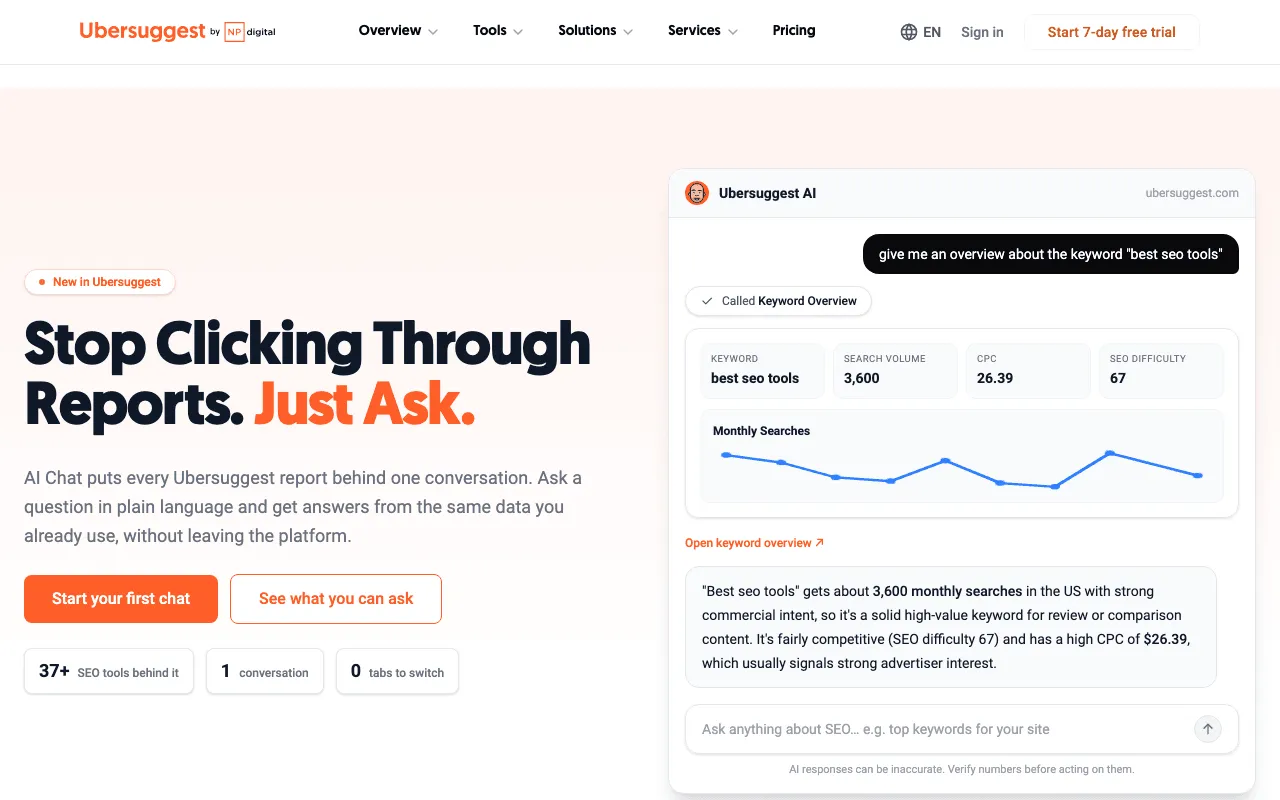
The page of Ubersuggest’s AI Chat, listed with the paid plans. Screenshot of https://ubersuggest.com/en/ai-chat-landing, taken on October 30, 2026.
The page also says rollout to all users is still in progress. Whether the free account gets AI Chat isn’t stated on the pages I read.
For content, the AI content generator turns a keyword or a tracked prompt into a full article with an image, links and a plagiarism score, exportable as PDF or Markdown, for 100 credits. There’s also a WordPress plugin that audits your site from wp-admin and applies AI fixes to titles, meta descriptions and H1s, compatible with Yoast SEO and Rank Math (help, August 25, 2026).
Reports export as CSV, PDF or images, 2,000 to 10,000 rows by plan. One limit for agencies: “Ubersuggest currently does not support generating white-label reports” (help, August 15, 2025).
Paid plans also change what Ubersuggest sends to your AI assistant. Its official MCP server has 42 tools in 8 categories and connects to Claude, Cursor, Codex, Windsurf and any MCP client, by OAuth, with no API key to paste. There’s an official ChatGPT app on the same tools. A free account runs every tool; your plan changes how much data comes back (MCP and Claude pages, read in French on October 29, 2026). Calls use the same daily searches and credits as the app, and generating an article through them still costs 100 credits on a paid plan.
Ease of use, the free Chrome extension and customer support
Ubersuggest’s home page puts a single search box at the top: type a site or a keyword and go. Its FAQ asks whether you need SEO experience to get value from it, and answers no (French version, October 29, 2026). Its Next Actions list opens each project on a prioritized to-do list, ranked by impact and effort.
Its page for business owners lays out the path in four steps: add your site, let it analyze, follow Next Actions, then apply fixes through the WordPress plugin (French version, October 29, 2026). The page’s 90-day scenario is presented as an illustration, not a promise of results, and that’s how you should read it too.
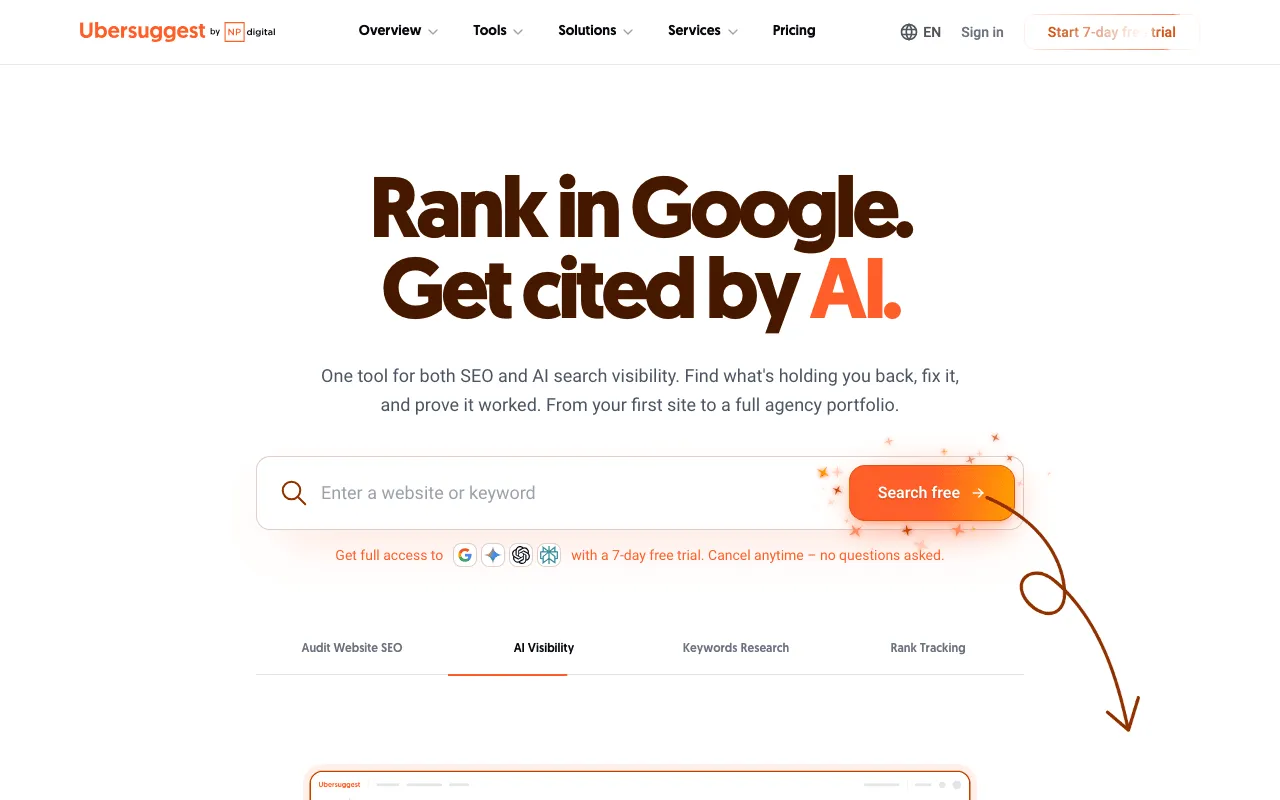
Ubersuggest’s English home page and its keyword search box. Screenshot of https://ubersuggest.com/en, taken on October 30, 2026.
The Chrome extension is free. It shows keyword volume, CPC and competition on Google, YouTube and Amazon, traffic estimates under results and domain metrics. Its Chrome Web Store listing showed 600,000 users when read on October 29, 2026. Daily searches in the extension: 40 without signing in or on a free account, 100 on Individual, 300 on Business, 900 on Enterprise. There’s no project management inside the extension (help, July 10, 2024).
Support is by email on the three paid plans, at [email protected], with a Help button in the app. The help center is in English only.
Two facts for your data: customer data is processed and stored in the United States, on AWS us-east-1, with no choice of region, and there’s no public SOC 2 or ISO 27001 certification (help, March 17, 2026).
Which Ubersuggest plan fits a small business or an online store
Pick by number of sites first, then by daily lookups.
- One site, you alone: Individual. $29 a month to try, $192 a year once you know you’ll stay. That’s $16 a month.
- Two to seven sites, or a partner who logs in too: Business, $49 a month or $326 a year.
- Eight to fifteen client sites: Enterprise/Agency, $99 a month or $657 a year. Remember there are no white-label reports.
- You hate subscriptions and you’ll use it for two years or more: lifetime Individual at $290, knowing AI is on demand only.
For an online store, check one thing first: the pages I read don’t mention a Shopify, Wix or Webflow connector for Ubersuggest. The WordPress plugin, the Google Search Console connection and Google Analytics by project are documented. If your store runs on WooCommerce, you’re on WordPress, where that plugin installs.
For a local shop, the Google Maps grid check is included in the paid plans, at 3 to 9 credits per check.
What two years of Ubersuggest cost, profile by profile
Here’s the same tool paid three ways over 24 months, from pricing.md (read October 30, 2026), before tax and add-ons:
| Plan | Monthly for 24 months | Yearly, twice | Lifetime, once |
|---|---|---|---|
| Individual | $696 | $384 | $290 |
| Business | $1,176 | $652 | $490 |
| Enterprise/Agency | $2,376 | $1,314 | $990 |
Three profiles, three answers:
- You’re testing SEO for the first time. Monthly Individual, with the 7-day trial and a reminder on day 6. If you stop after three months, you’ve spent $87 and kept your freedom.
- You know you’ll do SEO all year. Yearly Individual at $192. Over two years, you save $312 against monthly, and you keep the full AI limits.
- You’ll use it for years and rarely need AI. Lifetime Individual at $290. Over two years, you save $94 against yearly. Add a monthly AI option and that saving shrinks every month.
The one I’d avoid: paying monthly for more than seven months. Past that point, yearly would already have been cheaper.
Still unsure which plan? The Ubersuggest free account costs nothing and has no end date. Run it for a week. If 3 searches a day stop you every morning, you’ll know you need a paid plan.
Ubersuggest review from the documentation: reasons to buy, reasons to wait
Reasons to buy, each from Ubersuggest’s own pages:
- keyword research, site audit, rank tracking, backlinks and AI visibility in ChatGPT and Gemini, in one project;
- an entry price of $29 a month, or $16 a month on yearly billing;
- a lifetime option for people who don’t want subscriptions;
- an official MCP server, a ChatGPT app and a Claude plugin that work with a free account;
- a free Chrome extension and a WordPress plugin that applies fixes;
- a free plan with no time limit to try the interface.
Reasons to wait, from the same pages:
- a 7-day trial that needs a card and turns into a paid plan on its own;
- “Fees are non-refundable” after the trial, outside the EU’s 14-day right;
- no public API: “Ubersuggest doesn’t have API or webhook functionality” (help, October 3, 2025);
- no white-label reports, no SSO and no account switcher, per its home page FAQ;
- pages that contradict each other on rank-tracking frequency, crawl limits and which AI engines are tracked;
- data updated monthly, stored in the United States.
Ubersuggest’s pages give the price, the limits and most of the catches in plain text. That’s to its credit. The work for you is reading the lifetime terms and the trial rule before you click.
Ubersuggest vs Semrush, and what SemChat costs
When I read Google’s top 10 for “ubersuggest vs semchat” on October 29, 2026, the pages compared Ubersuggest with Semrush instead. So here’s that price gap. It’s wide.
Semrush has a free plan too: “No credit card required”, “1 demo project”, “10 reports per day across all vital tools” (semrush.com/pricing/seo-ai-search/, read October 30, 2026). Its SEO plan showed €134 a month from France, or €112.52 a month on yearly billing (pricing page, October 29, 2026). Data missing: Semrush’s price in US dollars on the live page (planned source: the pricing page reread from the United States).
Seen from France on the same days, that’s €134 against €29 for Ubersuggest Individual. For that money, Semrush’s SEO plan covers 5 sites and 500 keywords tracked daily; Ubersuggest offers a lower entry and a lifetime option. The details are on our Semrush price page.
And SemChat? It sells usage, not features: “Every feature, in every plan. Just pick your monthly usage.” (semchat.io/en/pricing, read October 30, 2026).
| SemChat plan | Monthly | Yearly |
|---|---|---|
| Free | €0, “Try semchat with no credit card” | €0 |
| Starter | €20 | €192 (€16 a month) |
| Pro 5x | €100 | €960 (€80 a month) |
| Pro 20x | €200 | €1,920 (€160 a month) |
Sources: SemChat pricing page, read October 29 and 30, 2026. Prices are in euros on every version of the site and read as excluding tax: my first Starter invoice was €24.00 with French VAT.
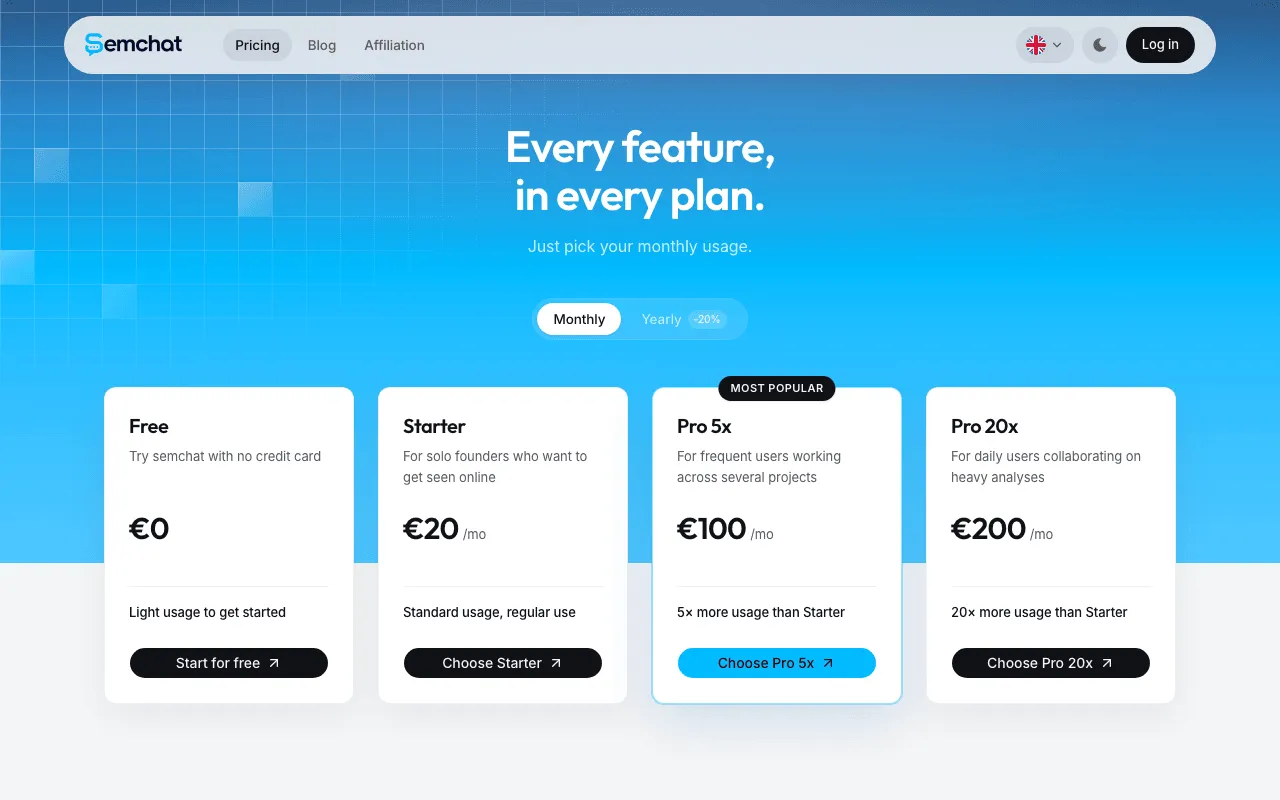
SemChat’s pricing page: the Free plan at €0, then Starter at €20 a month. Screenshot of semchat.io/en/pricing, taken on October 30, 2026.
Notice the yearly line: Ubersuggest Individual and SemChat Starter both cost 192 a year, dollars on one side, euros on the other. The plan-by-plan breakdown is on the SemChat pricing page.
If you sign up through my link and subscribe within 2 weeks, you get 10% off for life, with no code to type. The conditions are on the SemChat promo code page.
Ubersuggest vs SemChat: the full comparison
Price is only half of it. Ubersuggest is a suite of reports you can now talk to; SemChat is a chat that runs the reports for you. Ubersuggest tracks rankings and AI visibility; SemChat’s pages don’t mention either as available today. SemChat connects Bing, Webflow, Slack and Notion; Ubersuggest opens its data to Claude and ChatGPT through MCP.
Free plans differ in shape too: 3 searches a day on Ubersuggest, one full audit a month on SemChat Free in my test. The whole duel, line by line, is in Ubersuggest vs SemChat.
SemChat review: our test on a real site
On October 29, 2026, I opened SemChat on the Free plan and typed one sentence, in French: run an SEO audit of my site plugkit-avis.com and give me a clear action plan, by priority.
It picked its full SEO audit skill on its own, crawled the site, pulled positions, backlinks and 10 competitors, and came back about 3 minutes later with 8 KPIs, a 5-point diagnosis and 3 actions for the week.

The priority action plan SemChat returned after a single sentence (French interface). Screenshot of the SemChat app (my account, Free plan), October 29, 2026.
One action, create the contact page, was right: that page returned a 404 when I checked. The cost was steep: that one audit used 100% of the Free plan’s monthly quota.
So, Ubersuggest pricing in one line: $29 a month to start, $192 a year if you’ll stay seven months, $290 once if you’ll stay two years and live with on-demand AI. If what you want is a plan rather than reports, test SemChat Free on the same site first.
Frequently asked questions
Is Ubersuggest worth it?
On paper, for one site and a small budget, yes: $29 a month or $192 a year buys 150 searches a day, 125 tracked keywords, a 1,000-page weekly audit and AI Chat (pricing.md, read October 30, 2026). It's less of a fit if you need white-label reports, a public API or link-risk scores, which its own FAQ says it doesn't offer today. I haven't tested Ubersuggest on an account: this verdict comes from its documentation.
Which is better, Semrush or Ubersuggest?
Semrush has the bigger toolbox and the bigger bill: its SEO plan showed €134 a month from France on October 29, 2026, and its free plan gives 10 reports a day. Ubersuggest starts at $29 a month and offers a lifetime option. If you run one small site, Ubersuggest's price fits better; if you need Semrush's data depth, budget for it.
Is Ubersuggest free, or do you have to pay?
Both. The free account has no time limit but allows 3 searches or reports a day, 1 project and 25 tracked keywords (help article updated July 26, 2025). Paid plans start at $29 a month, with a 7-day free trial on monthly plans that needs a card.
How much does an SEO package typically cost?
I don't have a sourced figure for agency SEO packages, so I won't guess one. Data missing: typical agency SEO package prices in the United States (planned source: a dated survey of agency pricing). What I can give you is the tool side: Ubersuggest from $29 a month, SemChat from €20 a month excluding tax, and free plans on both.
How do you use the Ubersuggest Chrome extension?
Install it free from the Chrome Web Store, then search as usual on Google, YouTube or Amazon: it shows keyword volume, CPC and competition, traffic estimates under results and domain metrics (store listing, read October 29, 2026). Without signing in, or on a free account, you get 40 searches a day; paid plans raise that to 100, 300 or 900.
Can you cancel Ubersuggest anytime?
You can stop a subscription, but money already paid stays paid: “Fees are non-refundable” after the 7-day trial, per Ubersuggest's refund policy (February 15, 2026). Cancel during the trial to avoid the first charge. Customers in the EU keep a legal 14-day right to cancel, per the terms. Lifetime purchases are final.
Does Ubersuggest offer a discount?
Yes, for some people: 20% off monthly plans for students, for 12 months, and for nonprofits, on proof sent to support, not combinable (help article of February 20, 2026). Otherwise, the yearly plan is the cheapest way to pay by the month: $192 a year for Individual, or $16 a month.
Are Ubersuggest prices shown with tax?
The pricing page doesn't say. Ubersuggest's terms state fees are in US dollars unless stated otherwise and that taxes, VAT included, are paid by the customer (terms updated May 20, 2024). Expect tax on top where your country charges it.
Let your AI do the chores of getting found online.
10% off your subscription, for life with my link, if you subscribe within 2 weeks of signing up. No code. All about the SemChat promo code
Affiliate link: it costs you nothing extra.
Verified sources
- Ubersuggest pricing in plain text (US dollars, limits by plan, lifetime) (October 30, 2026)
- Ubersuggest pricing page (plans, add-ons, FAQ) (October 29, 2026)
- Ubersuggest home page (FAQ: trial, lifetime, AI engines, what it doesn't offer) (October 29, 2026)
- Ubersuggest help: Refund Policy (October 29, 2026)
- Ubersuggest help: How Lifetime Subscriptions Work (October 29, 2026)
- Ubersuggest help: AI Search Visibility Limits for Lifetime Plans (October 29, 2026)
- Ubersuggest help: AI Writer access, credits, billing and add-ons (October 29, 2026)
- Ubersuggest help: Chrome Extension Limits per Tier (October 29, 2026)
- Ubersuggest AI content generator (credits per article) (October 29, 2026)
- Ubersuggest local SEO checker (credits per check) (October 29, 2026)
- Neil Patel Digital terms of service (updated May 20, 2024) (October 29, 2026)
- Semrush pricing (Free plan, SEO plan) (October 30, 2026)
- SemChat pricing (English) (October 30, 2026)