SemChat tutorial: from sign-up to your first action plan
This SemChat tutorial follows what I did on 29 October 2026, on my own account: create the account, type a single sentence, read the action plan it returned in about 3 minutes, find the site under “Sites”, connect Search Console. And the trap to know before you start: on the Free plan, that first audit used up the whole month's quota.
 By Jérémy Santos Updated on 30 October 2026 Tested on his own SemChat account: first audit on 29 October 2026.
 This SemChat tutorial doesn’t start from a vendor demo. It follows my own account on 29 October 2026, on my site plugkit-avis.com. One sentence typed, about 3 minutes of waiting, and an action plan with 3 tasks for the week. You can repeat every step on your own site.
One thing to know up front: my account shows SemChat’s interface in French. Every screenshot below says so, and I translate each label the first time it appears.
SemChat tutorial: what you need before you start
- A live website: SemChat analyses a public address. You don’t have to change anything on it to follow this guide.
- A SemChat account: the Free plan costs €0 and asks for no credit card (pricing page read on 30 October 2026).
- Access to your Google Search Console and Google Analytics 4, if you want step 4. Without them, SemChat works from estimates.
- Ten minutes and one clear question about your site.
Step 1: create your account through the link
On semchat.io, the “Start for free” button leads to the app’s sign-up page. The simplest way: use the button below, which takes you straight there.
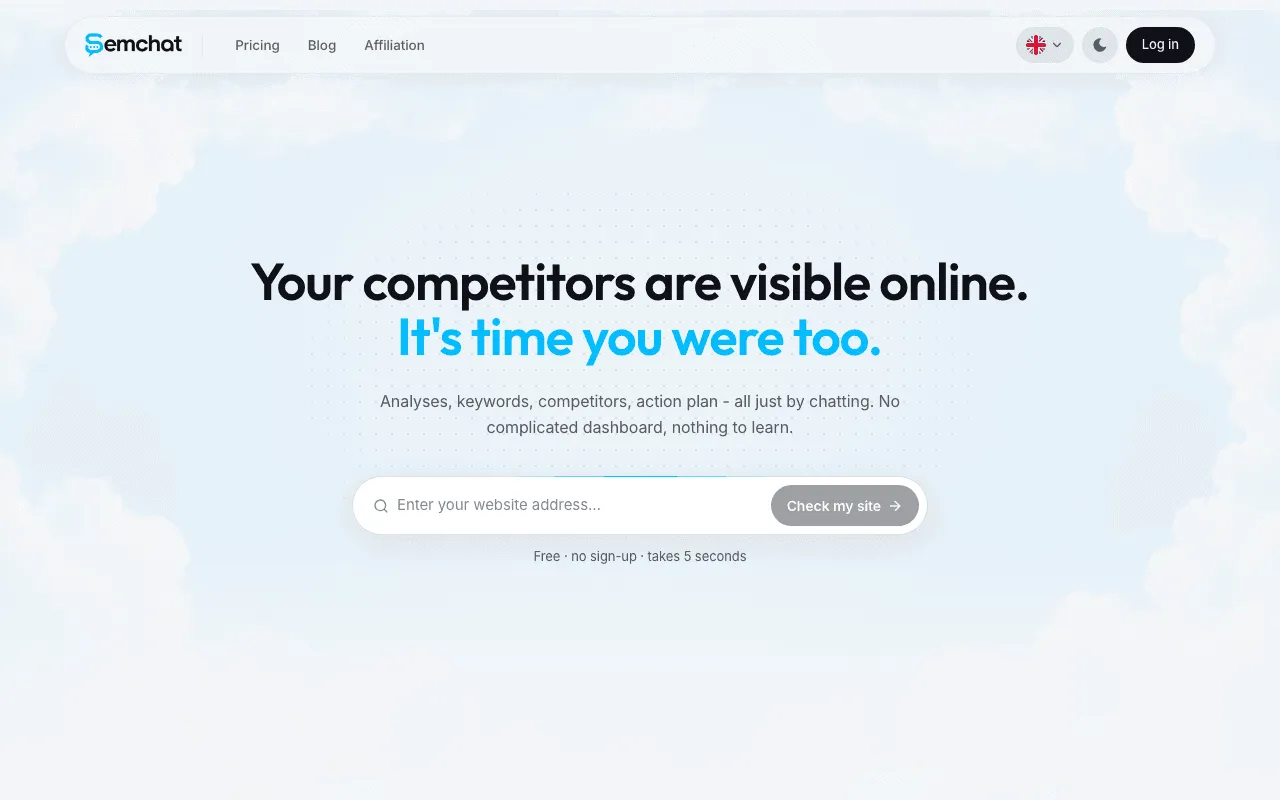
If you just want a first opinion before you create an account, the home page also offers “Check my site”: free, no sign-up, and it “takes 5 seconds”, says the page. It is a preview, not the full audit of step 2.
Free plan or subscription: where to start
Start on Free. Every plan has the same features; only the monthly usage changes. Starter is €20 a month, Pro 5x €100, Pro 20x €200, with 20% off on yearly billing (pricing read on 30 October 2026). The details are on our SemChat pricing page.
If you move to a paid plan within 2 weeks of signing up through our link, you get 10% off for life (e-mail from Adrian Delmarre, of Haloscan, 29 October 2026). The conditions are on the SemChat promo code page.
Step 2: run your first audit in one sentence
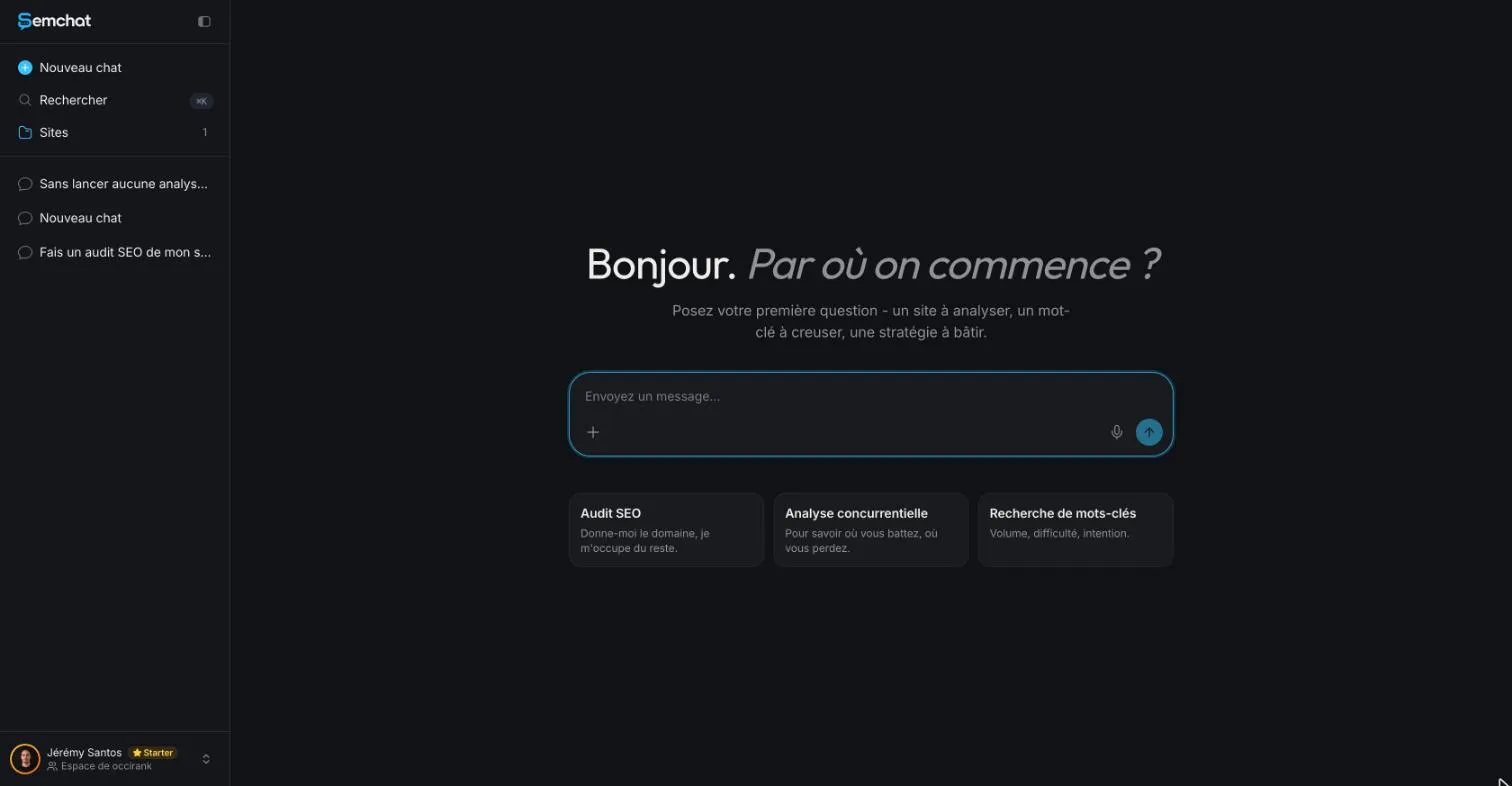
The app’s home screen greets you with “Bonjour. Par où on commence ?” (Hello. Where do we start?). Below it: a text box, a microphone to dictate, and three shortcuts for an SEO audit, a competitor analysis and keyword research.
The exact sentence we typed, in French
In a new chat, I typed, word for word:
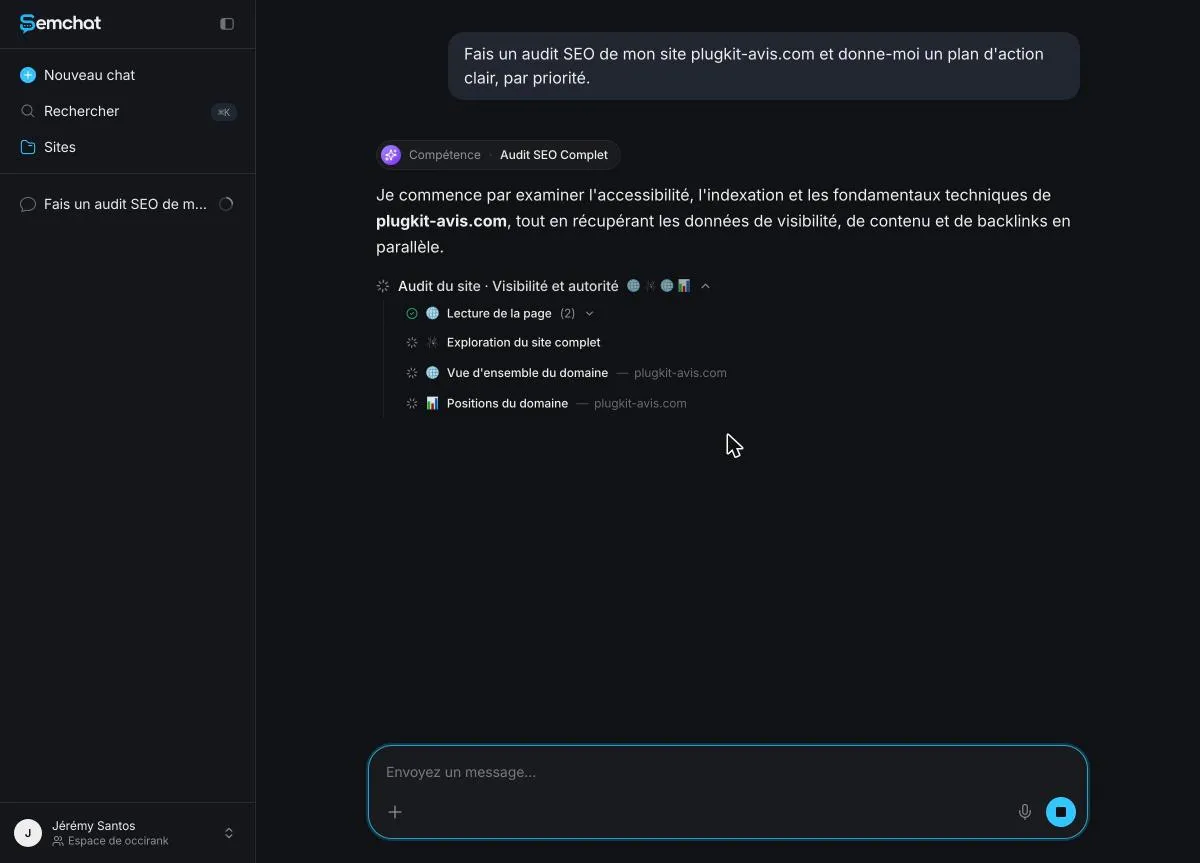
Fais un audit SEO de mon site plugkit-avis.com et donne-moi un plan d’action clair, par priorité.
In English: “Run an SEO audit of my site plugkit-avis.com and give me a clear action plan, by priority.” Nothing else. No settings, no menu. Swap in your own address.
The home shortcuts, and how SemChat picks a skill
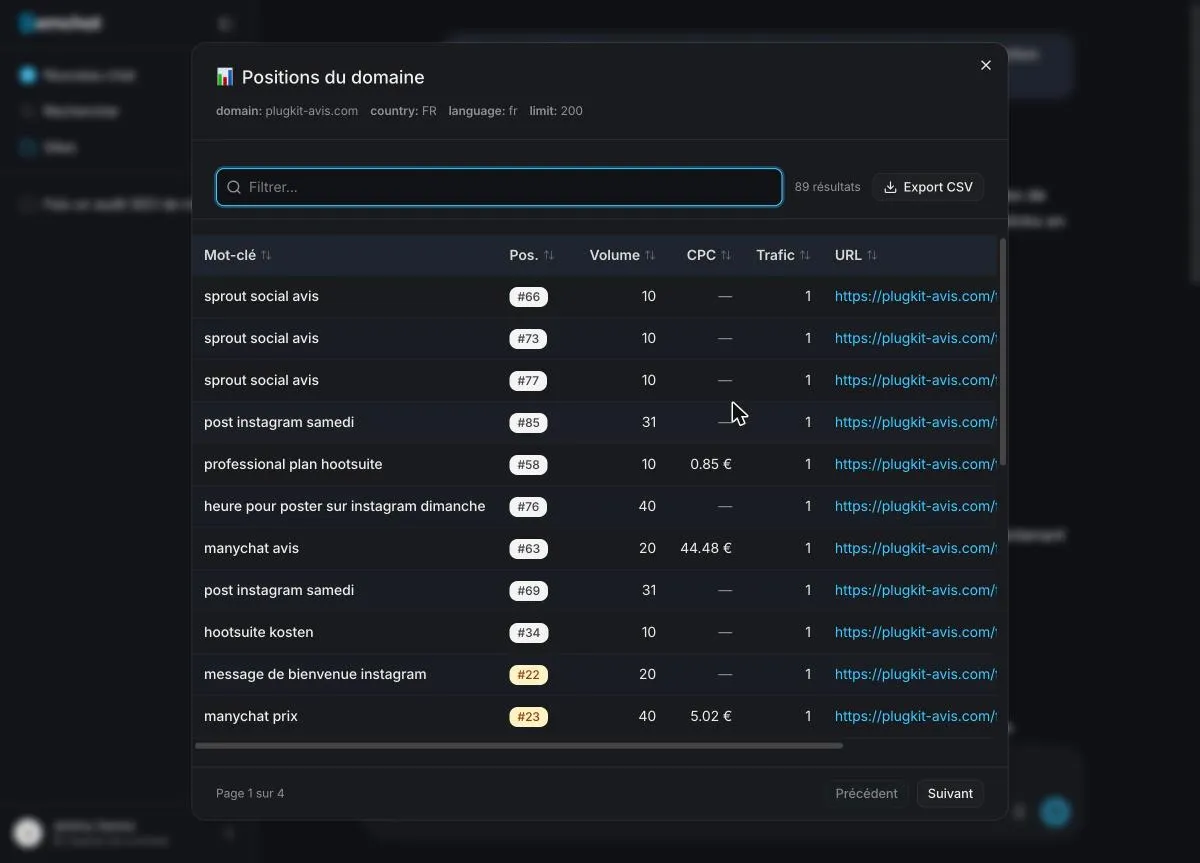
SemChat picked the “Audit SEO Complet” (full SEO audit) skill on its own. Then it ran its tools one after another, visible on screen: reading the pages, crawling the site, rankings (89 results), best pages, inbound links, 10 competitors, the gap with 5 of them. About 3 minutes passed between sending and the action plan.
You can also pick the skill yourself, with the “+” button in the message bar. It lists 17 of them, from an accessibility audit to local SEO. One detail: the keyword research card on the home screen isn’t a skill, just a ready-made request.
Step 3: read the results and the action plan
The indicators and the diagnosis
The answer opens with a grid of 8 indicators. For my site, on 29 October 2026: an estimated 28 visits a month, 61 ranking keywords, a technical score of 99 out of 100, 189 indexable pages, but duplicate titles on 100 pages and a single site linking to mine.
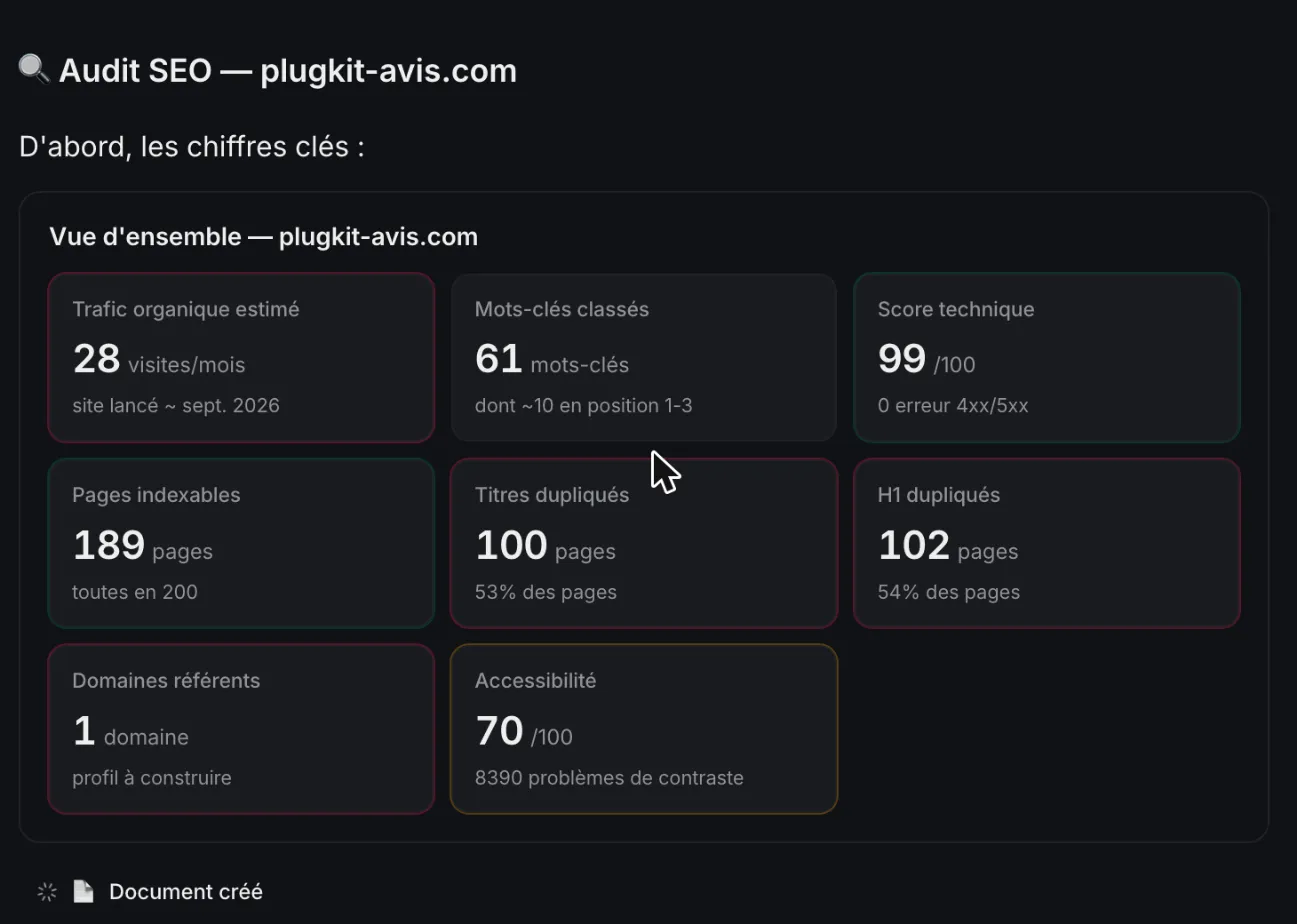
Next comes a 5-point diagnosis, then 3 actions to take this week. Mine: create the /fr/contact/ page, which returned a 404 error; make my titles different across language versions; flesh out my comparisons page.
I checked two findings by hand. The contact page was indeed missing. The duplicate titles were real, but between two language variants declared to Google: a useful flag, in a slightly alarming tone. The rule to keep: before you act on a number, ask where it comes from.
The audit document and the data export
The full audit also opens in a panel on the right: a 10-section document, with one button to copy it and one to download it. Each work step has a “Voir détails” (see details) button that opens the raw table, which you can filter and export as CSV.
Your site’s own page, created automatically
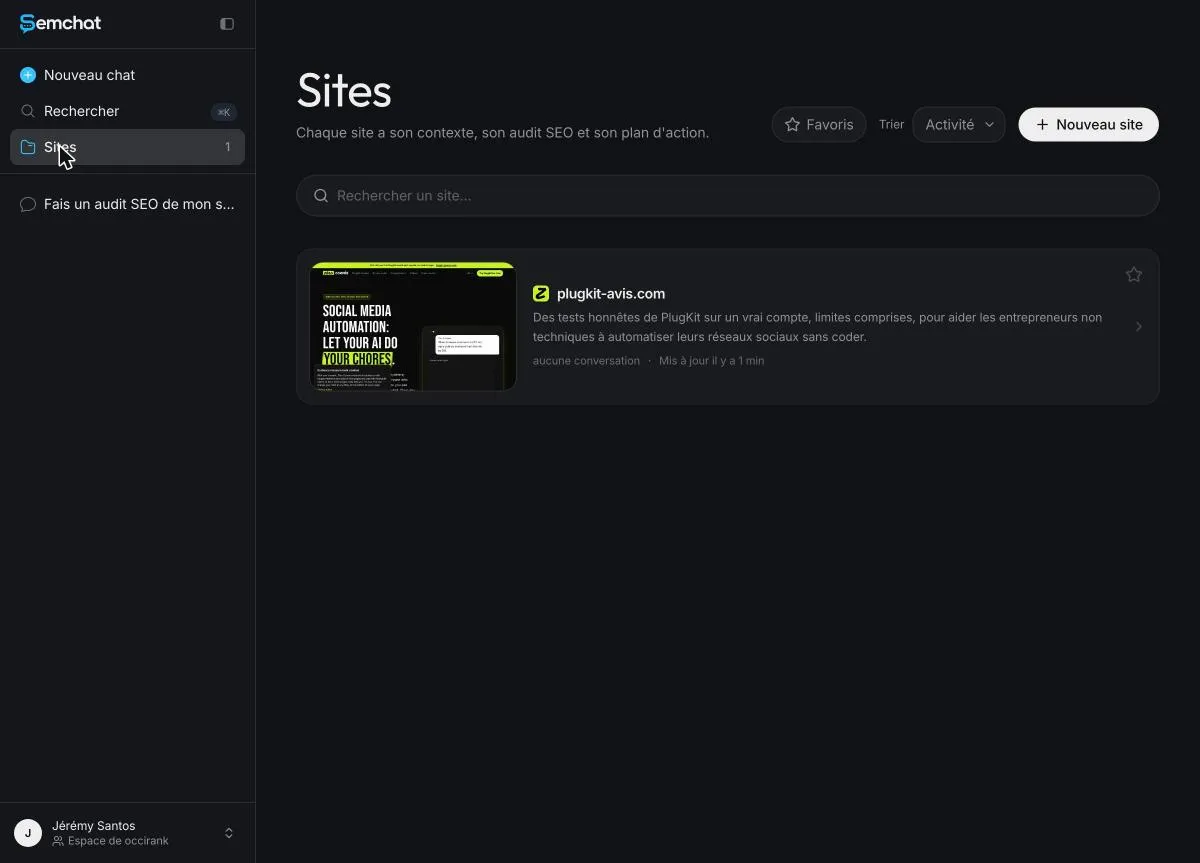
After the audit, open “Sites” in the left menu. SemChat created a page for your site there, with a thumbnail and a description of your business that it wrote by itself. Read it over: it’s the context it will reuse in your next conversations.
In the site’s settings, you can add instructions for all its conversations: your trade, your town, your customers. Click the save button: without that click, the text is lost when you change pages.
Step 4: connect Search Console and GA4
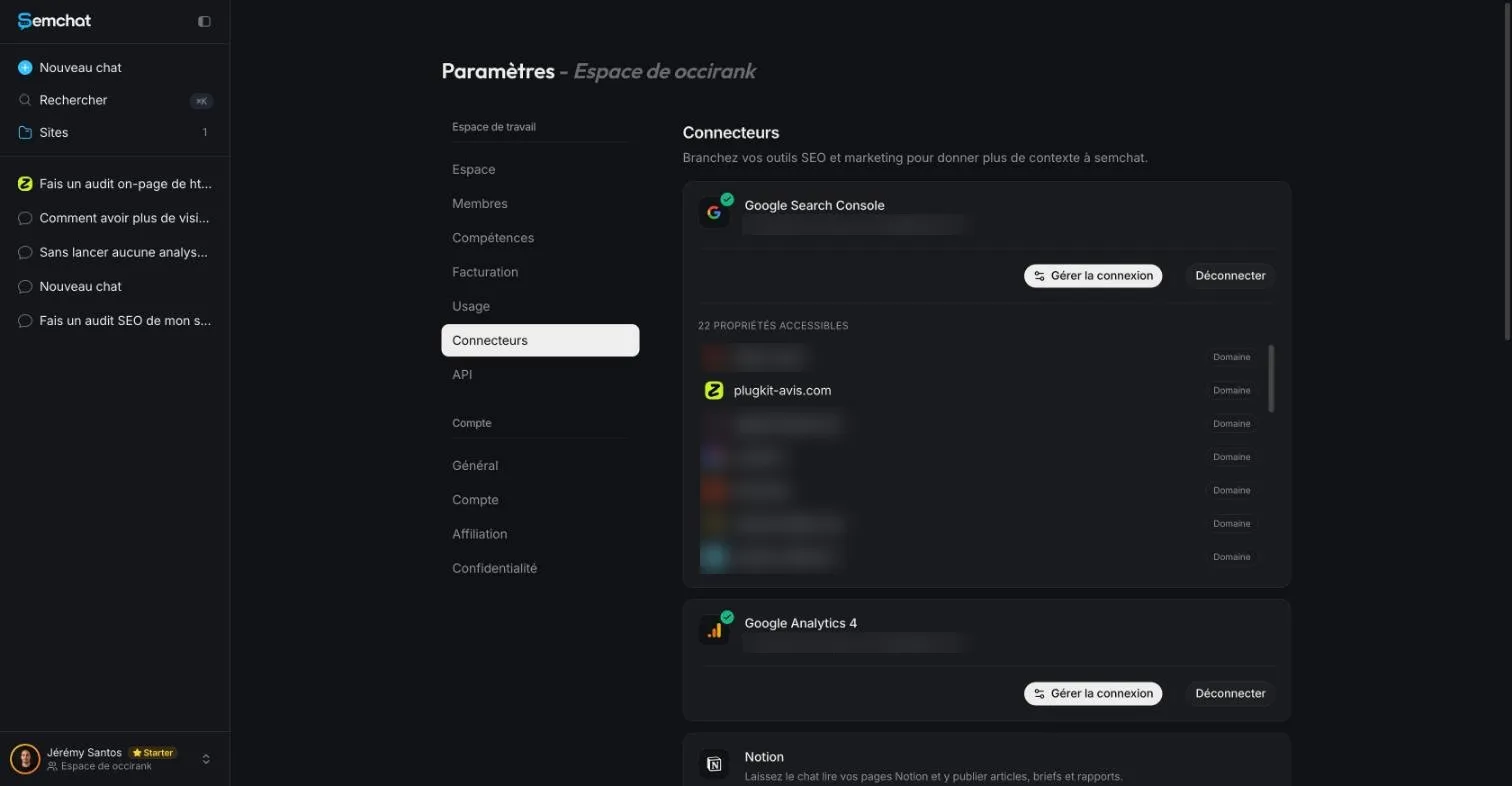
Go to Settings, then Connectors. You’ll find 8 of them: Google Search Console, Google Analytics 4, Bing Webmaster Tools, Yandex Metrica, WordPress, Webflow, Notion and Slack. Plus a custom connector for an MCP server. Click connect and allow access with your Google account.
A limit we saw: the site’s chat didn’t see Search Console
The site’s page says that without its own connection, the site uses the workspace connectors. In my test, that didn’t follow through. The chat linked to the site answered “Je n’ai pas accès à ta Search Console” (I don’t have access to your Search Console).
What worked: a new chat in the workspace. It read Search Console, at first on 10 rows only. When I pushed, it gave the real total: 8 clicks and 533 impressions over three months, the same figures I found in Search Console itself. So for your real data, start from a new chat.
Step 5: ask your next questions, skill by skill
Once you’ve read the first plan, move one question at a time. Three habits made the difference in my tests.
Keyword research and keyword groups
Start from the keyword research card, then ask for groups with the “Clustering de mots-clés” (keyword clustering) skill. On 29 October 2026, the first list mixed in many brand names, and its “difficulty” was ad competition, not how hard it is to rank in Google. Once I pointed it out, SemChat answered “Tu as raison sur les trois points” (you’re right on all three points) and sorted the groups by intent.
Write a precise request, as you would to a consultant
Say what you want, for which site, and in what form. A few requests that work well:
- “Which pages of my site aren’t in Google, and why?”
- “Find 20 keywords for my business and keep the 5 that lead to a purchase.”
- “Prepare the brief for my next page on this keyword.”
When you open a chat, SemChat offers to link it to one of your sites. Accept: the documents it produces are then filed in the site’s library.
Check every answer before you apply it
Ask “Where does this number come from?” as often as you need. SemChat gives its sources when asked: in my keyword test, it named its own database and a 12-month average. A page it suggests may already exist on your site, so look before you write.
The 17 skills behind the “+” button fall into four families, covered below. On 29 October 2026, 13 of them ran in a real conversation on my sites (typed in French, on French pages). The other 4 we tested on 30 October 2026, on the Starter plan: the accessibility audit, the backlink audit, the semantic cocoon and the site launch. All 4 times, SemChat picked the right skill on its own, and the 4 tests used 13.9 points of the month’s quota (56.4%, then 70.3%).
Automated SEO audit: the audits SemChat runs for you
Five audit skills: the full SEO audit from step 2, the technical audit, the on-page audit of a single page, the EEAT (trust) audit and the accessibility audit. We tested the first four on plugkit-avis.com. Their findings were often right, like the contact page returning a 404 error. But the technical audit named, as the “one thing to fix first,” a change that didn’t alter crawler access at all, and the EEAT audit said a photo was missing from the author page when it was there. The accessibility audit, tested on 30 October 2026, returned a score of 70 and a single issue, text contrast, in under a minute, for 1.4 points of the Starter quota. Its page language finding is right; its advice was written for WordPress on a site that doesn’t use it, and its score hasn’t been cross-checked with a public tool yet (missing data). The skill-by-skill detail is on the automated SEO audit page. To run the same checks by hand, step by step, follow our SEO audit checklist.
SEO content tool: what SemChat prepares before you write
Five content skills: content brief, content refresh, topic cluster, semantic cocoon and keyword clustering. We tested all five. They handle the slow part, like an 11-part brief or keywords grouped by intent. Yet each of the five got something wrong at least once: search volumes far from DataForSEO’s, and pages suggested that already existed on the site. It’s all on the SEO content tool page.
The semantic cocoon, tested on 30 October 2026, mapped the site’s 5,486 links and returned the list of links to add, with anchor and direction, for 4 points of the Starter quota. But it called a link missing that existed, and a page “to create” that was already live: check every “missing” before you act.
Link building tool: count, judge and plan your links
Two skills for the links other sites make to yours. The link campaign skill, which we tested, counted right (1 link, 1 site) and proposed a sound plan of 12 free links over 3 months. But it called the profile “propre” (clean) when that single link came from a link agency’s page (DataForSEO Backlinks, 29 October 2026). The backlink audit skill, tested on 30 October 2026, made the same mistake: a right count, confirmed by DataForSEO Backlinks, but a profile called risk-free without naming the link’s source. It used 5.6 points of the Starter quota, the most of that day’s four tests. More on the link building tool page.
Automated SEO: what an assistant does for you, and what stays yours
Five skills to decide what to do next: SEO strategy, competitor analysis, local SEO, site launch and indexing. We tested all five. SemChat read my Search Console correctly: 8 clicks and 533 impressions. It also put a French keyword at 655 searches a month when DataForSEO Google Ads gives 210 (29 October 2026), and told me to add to my sitemap a page that was already in it. What it does well and what stays yours: see the automated SEO page.
The site launch skill, tested on 30 October 2026, returned a 90-day plan in about 3 minutes, for 2.9 points of the Starter quota. Its first two actions rested on false findings: add hreflang tags that were already there, create a contact page that was already live. It had read the previous day’s analysis, not the live site.
The trap: the Free plan quota
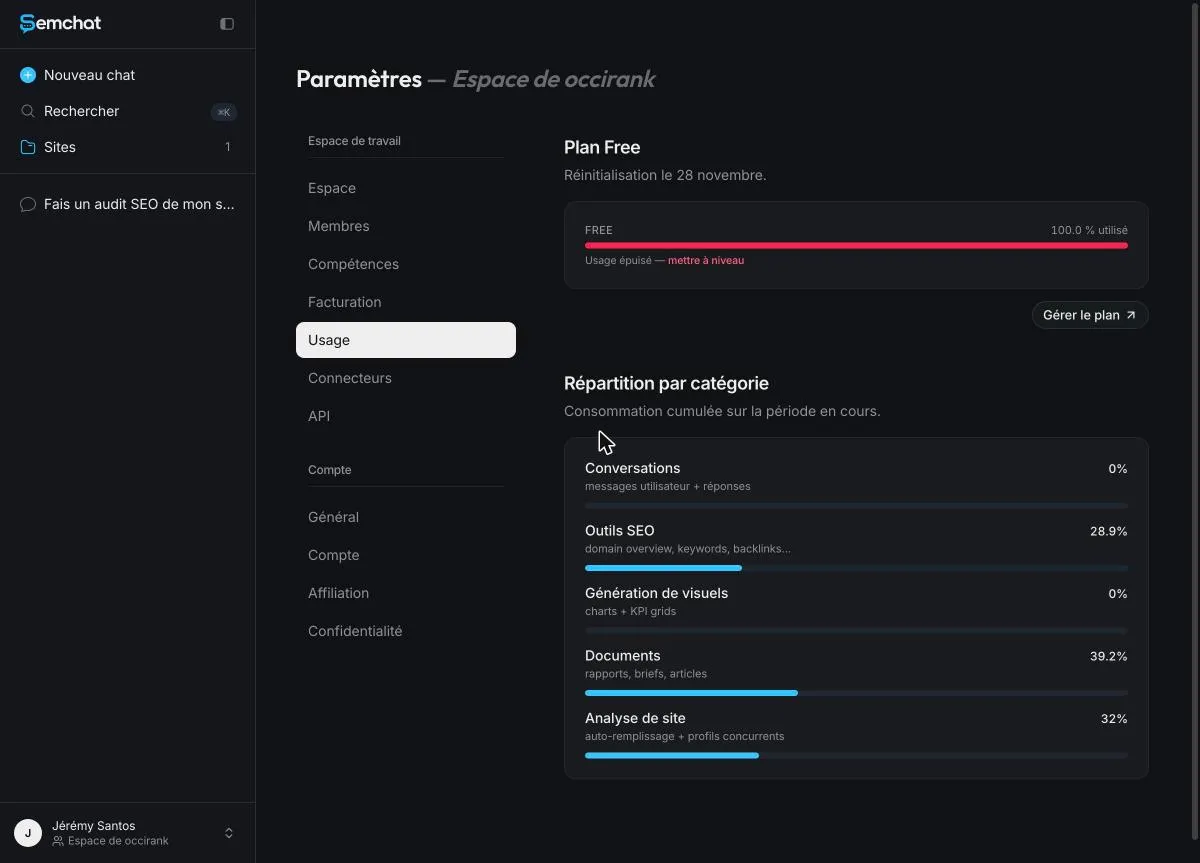
The Free plan is for trying things out. My first full audit used 100% of the monthly quota: 28.9% on SEO tools, 39.2% on documents, 32% on site analysis. The Usage screen said “Usage épuisé” (usage used up), and the pricing page says “everything resets at the start of your next billing cycle”.
Three tips:
- Keep that first audit for your real site, not a test run.
- Connect Search Console first, so the audit starts from your real figures.
- If you want to keep going within the month, Starter costs €20 a month. Our SemChat review says what it’s worth after a real test, limits included.
This SemChat tutorial stops where the work begins: applying the 3 actions. Check in again in a month, in a new chat, with Search Console connected.
Frequently asked questions
Who makes SemChat?
ARCHI301, a company based in Nice, France, which also makes the keyword tool Haloscan: the same company registration number appears in semchat.io's terms and in haloscan.com's legal notice (both read on 29 October 2026). In France, SemChat uses Haloscan's keyword data (e-mail from Adrian Delmarre, of Haloscan, 29 October 2026).
Can you use SemChat the way you'd use ChatGPT for SEO?
The way you talk to it, yes: you type a plain sentence and get an answer. The difference is what sits behind the answer. SemChat runs SEO tools on your site (crawl, rankings, links, competitors) and shows each step, with a “Voir détails” (see details) button that opens the raw data. That is what I saw on 29 October 2026.
How do you use SemChat for keyword research?
Start with the “Recherche de mots-clés” (keyword research) card on the home screen, then ask for keyword groups with the keyword clustering skill. Ask for the source of the search volumes and for an SEO difficulty, not an ad one: in my 29 October 2026 test, the first answer used ad competition as “difficulty” until I asked.
Which AI tool should you start with for SEO?
If you want an action plan without learning an SEO dashboard, a chat assistant like SemChat is a fair first step: its Free plan costs €0, no credit card (pricing page read on 30 October 2026). If you want to dig through keyword tables yourself, a classic tool fits better. In both cases, check the numbers before you act on them.
Let your AI do the chores of getting found online.
10% off your subscription, for life with my link, if you subscribe within 2 weeks of signing up. No code. All about the SemChat promo code
Affiliate link: it costs you nothing extra.