SEO content tool: what SemChat prepares before you write
A useful SEO content tool doesn't write for you: it prepares. SemChat has five content skills (content brief, content refresh, topic cluster, semantic cocoon, keyword clustering); we tested four of them on 29 October 2026, on a real site, and the fifth on 30 October 2026. They save you the slow part, but each of the five got something wrong at least once, so you still check.
 By Jérémy Santos Updated on 30 October 2026 Tested on his own SemChat account: first audit on 29 October 2026.
 This page is part of the guide: SemChat tutorial

What the tool prepares before you write: the outline, the words, the links. Illustration by Zéro Corvée.
You can write. What eats your time is everything that comes first: picking keywords, building the outline, checking that the page doesn’t already exist, planning the links. A useful SEO content tool takes on that part.
This page is part of our SemChat tutorial and covers SemChat’s five content skills. We tested four of them on 29 October 2026, on plugkit-avis.com, my other site. The fifth, the semantic cocoon, we tested on 30 October 2026, on the same site. For each one: the sentence typed, what it got right, what it got wrong, and the page with the full test.
Every test was typed in French, on a French site, with the interface in French. How the skills handle the same requests in English is missing data (planned source: an English test). The SemChat buttons on this page are affiliate links.
SEO content tools: what they prepare before you write
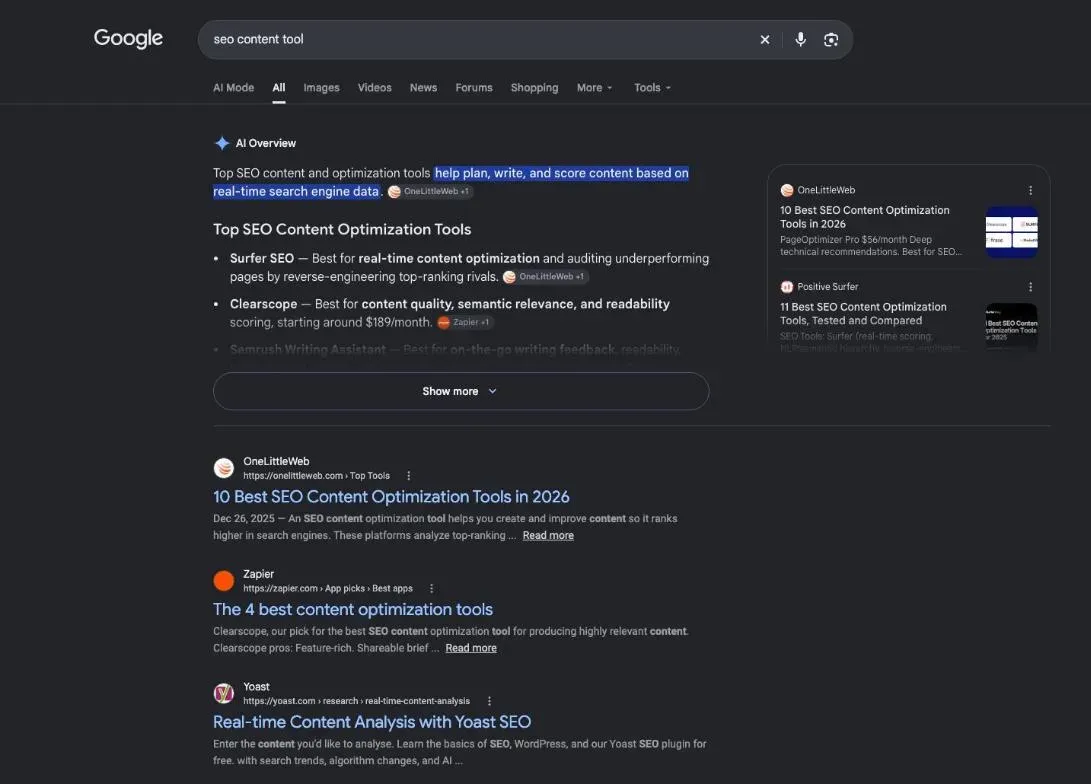
Search for “seo content tool” in the United States and half of the top ten results are lists of tools (DataForSEO, 29 October 2026). This page isn’t one more list. It looks at what an assistant prepares before you write, and what that’s worth once you check it.
- 1 Group keywords Keyword clustering: one group per page.
- 2 Organise pages Topic cluster and semantic cocoon: pillar, articles, links.
- 3 Prepare the page Content brief: intent, outline, questions, links.
- 4 Write and check Your part: the text, the numbers, the sources.
- 5 Refresh Content refresh: the pages losing clicks.
SEO writing tools, from keyword to final read
Each step has its tools: a keyword database for search volumes, Google itself to see what ranks, Search Console to track your clicks. SemChat brings them into one conversation: you type a sentence, it runs its tools, then it returns a document.
Content is only part of its skills. On this site, they’re grouped into four families: audits, with an automated SEO audit; links from other sites, with a link building tool; the overall plan, with automated SEO; and content, on this page.
In SemChat: pick a skill, type one sentence
In the message bar, the “+” button opens three options: “Téléverser un fichier” (upload a file), “Connecteurs” (connectors) and “Compétences” (skills). Pick a skill and SemChat fills the bar with a template sentence that you complete. It can also pick the skill on its own; a “Compétence” (skill) label shows it.
One trap we hit: the home screen shows a “Recherche de mots-clés” (keyword research) card, but no skill has that name. To group keywords, use the keyword clustering skill.
Last setting: when SemChat offers to link the conversation to your site, accept. The document it returns is then filed in that site’s Library.
Content brief generator: the brief SemChat wrote, checked line by line
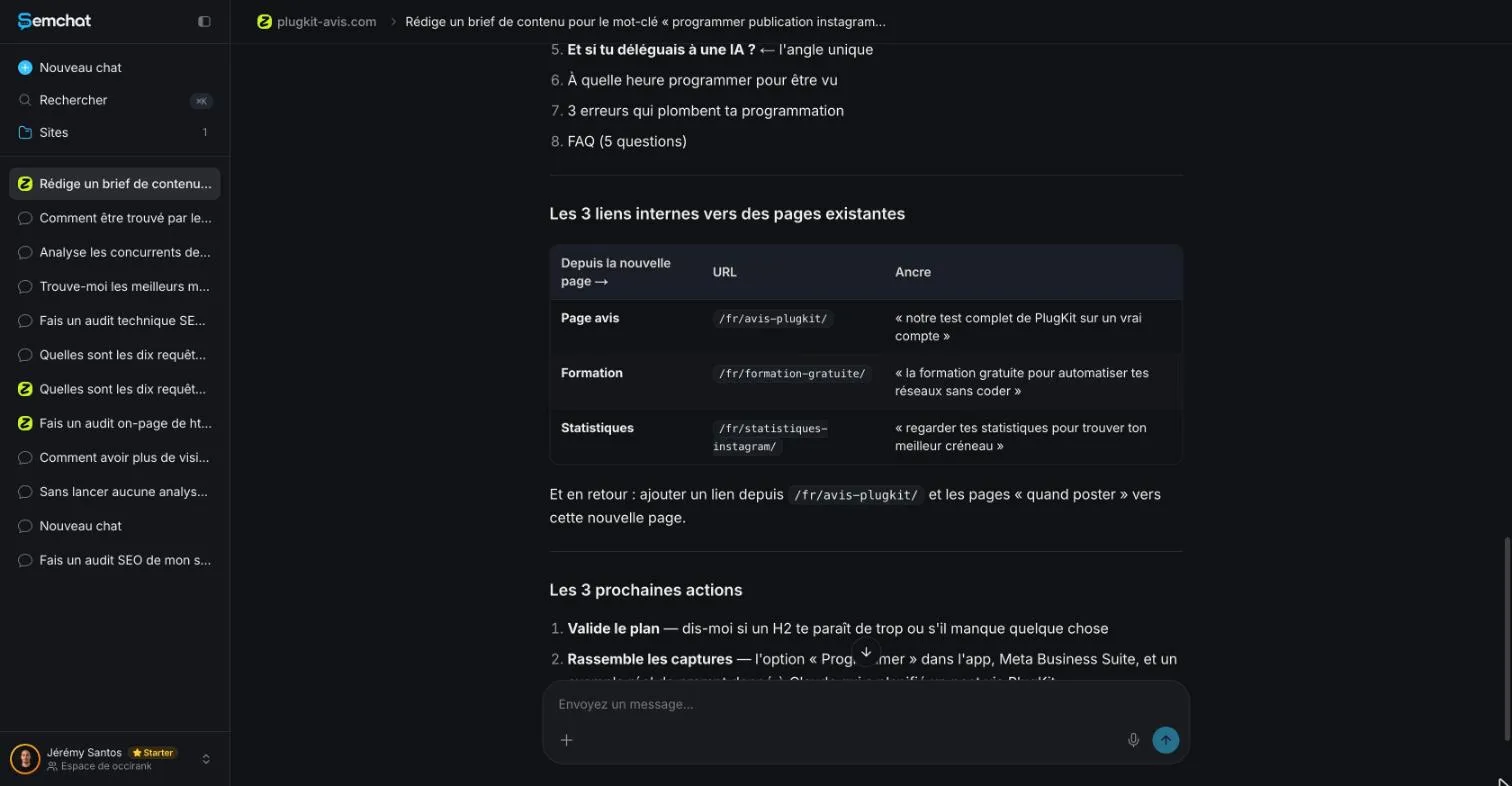
The brief skill, called “Brief rédactionnel” (writing brief) in the French interface, starts from the template “Rédige un brief de contenu pour le mot-clé” (write a content brief for the keyword). I added my reader, the outline I wanted, a five-question FAQ and three links to existing pages. It returned an 11-part document with the right search intent and a “Fact gate,” a rule that requires a source for every number.
Four things needed fixing: a heading that duplicated an existing page, volumes to cross-check (500 searches a month according to SemChat, 590 according to DataForSEO Google Ads for France, and 90 against 20 on a secondary keyword), an FAQ answer stated without a source despite that rule, and link text written as long sentences. Cost: 2.5 points of the Starter plan’s monthly quota. The full test is on our content brief generator page.
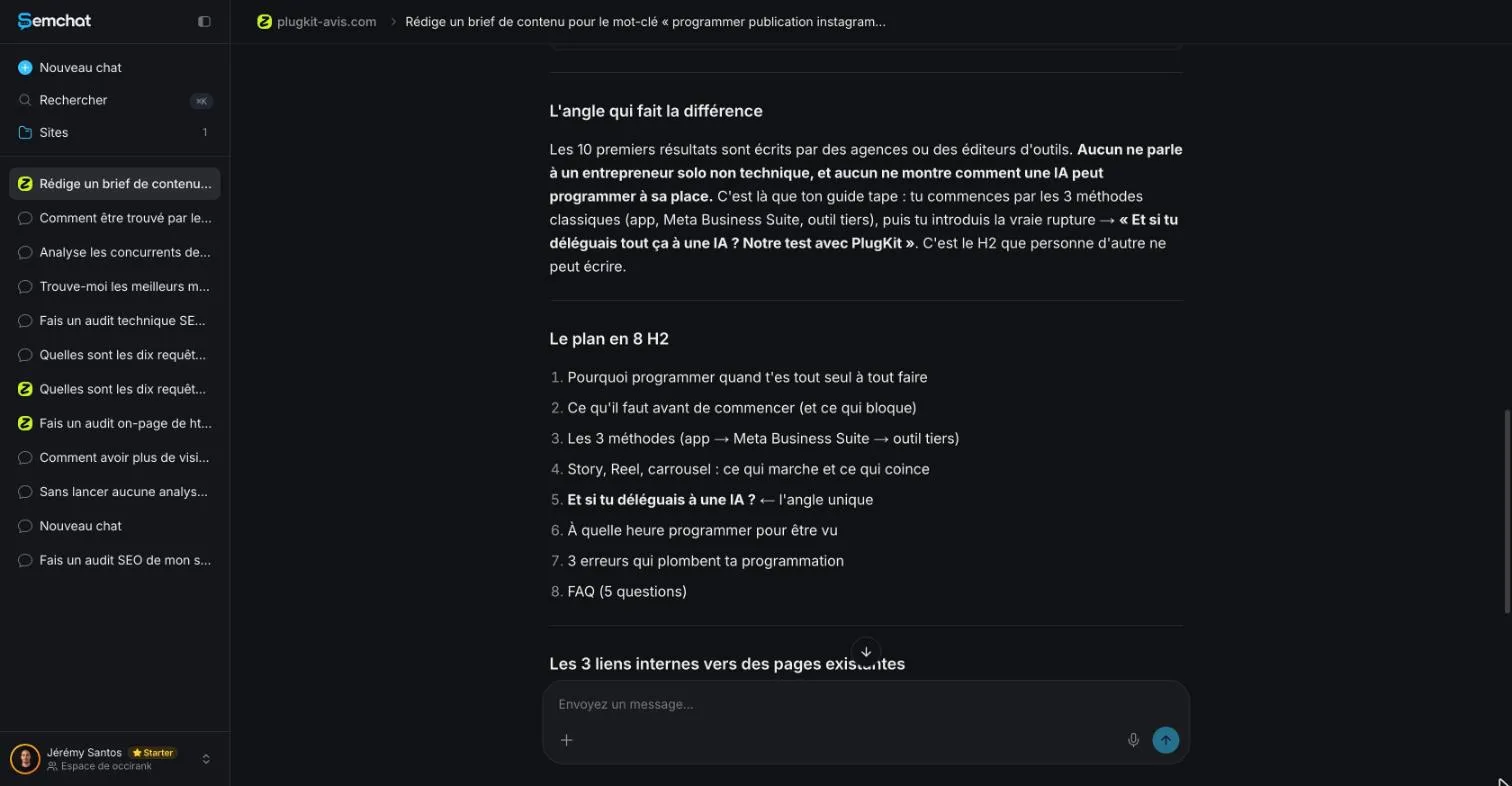
Writing styles and the document Library
Two settings matter before the brief. In the site’s settings, SemChat offers 11 writing styles. I picked “Pédagogique” (teaching), which the app describes as “Explique, définit les termes, pas à pas” (explains, defines terms, step by step).
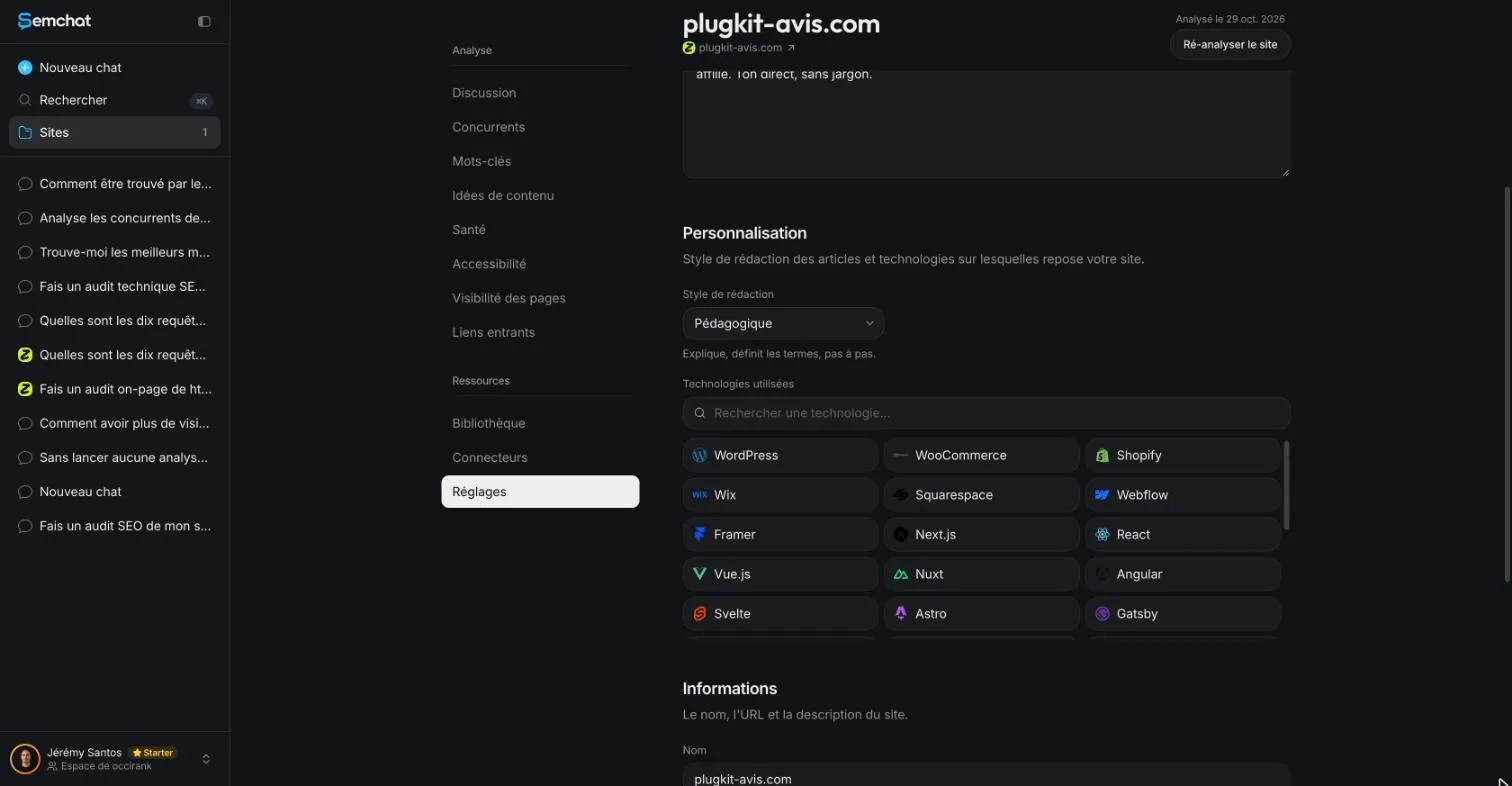
Then, a document produced in a conversation linked to the site is filed in that site’s Library, under Documents. A conversation that isn’t linked doesn’t show up there: you’d have to dig your brief out of the chat history.
Prepare a content brief yourself
Without a tool, the method is the same: read the top five Google results, note their headings and questions, pick an angle, then check your sitemap to make sure the page doesn’t already exist. It takes longer, but you’ll understand what the tool does for you. Our content brief template lists every field, from the keyword to the page to beat.
10% off your subscription, for life with my link, if you subscribe within 2 weeks of signing up. No code. All about the SemChat promo code
Try SemChat for free Free plan, no credit card. Affiliate link: it costs you nothing extra.
How to update old blog posts: find the ones in decline, then refresh them
The content refresh skill starts from “Identifie les pages en déclin de mon site et planifie leur mise à jour” (identify the pages in decline on my site and plan their update). I asked it to compare the last 28 days with the 28 days before in my Search Console. Good point: it said plainly that it had no access to Search Console, and it rightly concluded that a site this young had no measurable decline.
It then worked from estimated positions and volumes that Search Console partly contradicted, and three of its five suggestions for the chosen page didn’t hold up. Cost: missing data for this test alone (7.1 points of the Starter plan for three tests together). The details are on our how to update old blog posts page.
Check how your content performs in Search Console
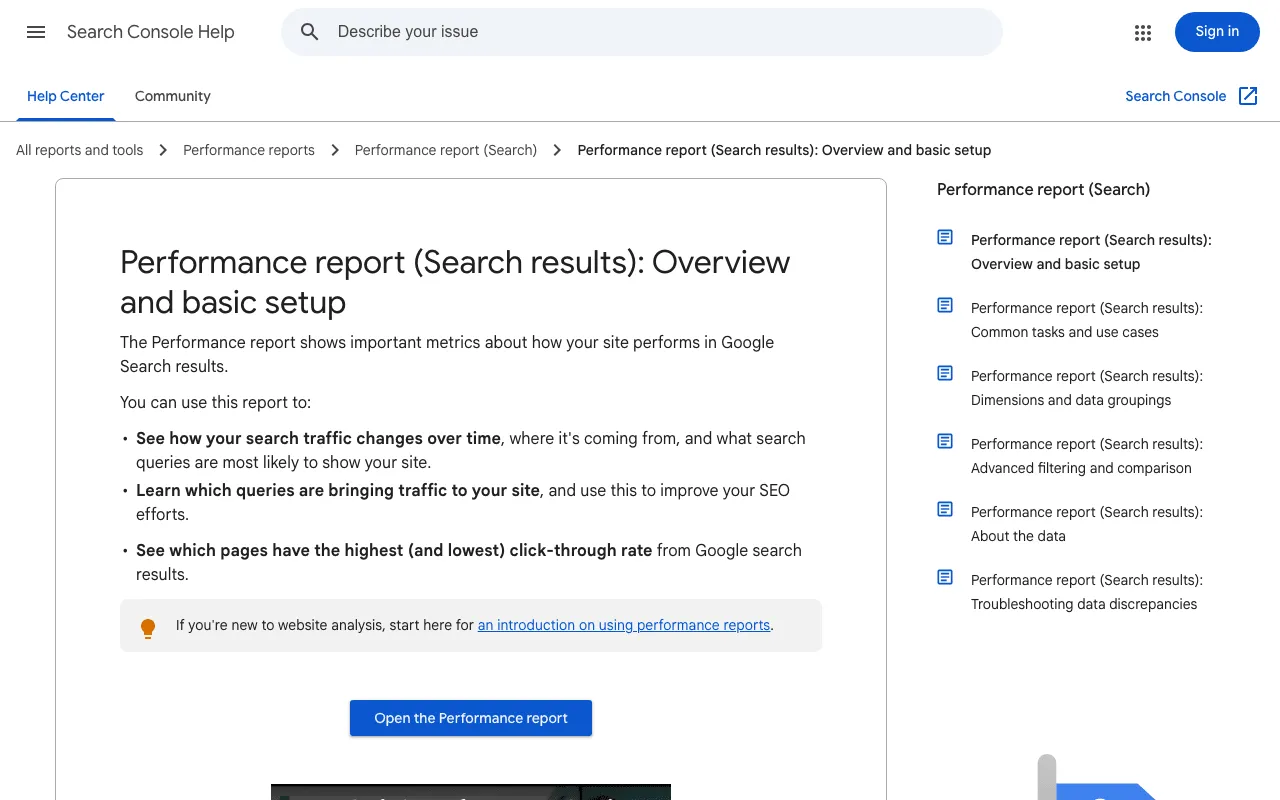
You can do the spotting yourself, for free. Google’s help says the Performance report lets you “See how your search traffic changes over time, where it’s coming from, and what search queries are most likely to show your site” (read 30 October 2026). Compare two periods of the same length, open the Pages tab, and look at clicks first.
To have SemChat read your real numbers, run the skill from a new chat in your workspace, not linked to the site. In our tests on 29 October 2026, the linked conversation didn’t see the Search Console connected to the workspace; a conversation started separately read it.
Topic cluster tool: the pillar and articles SemChat planned, checked
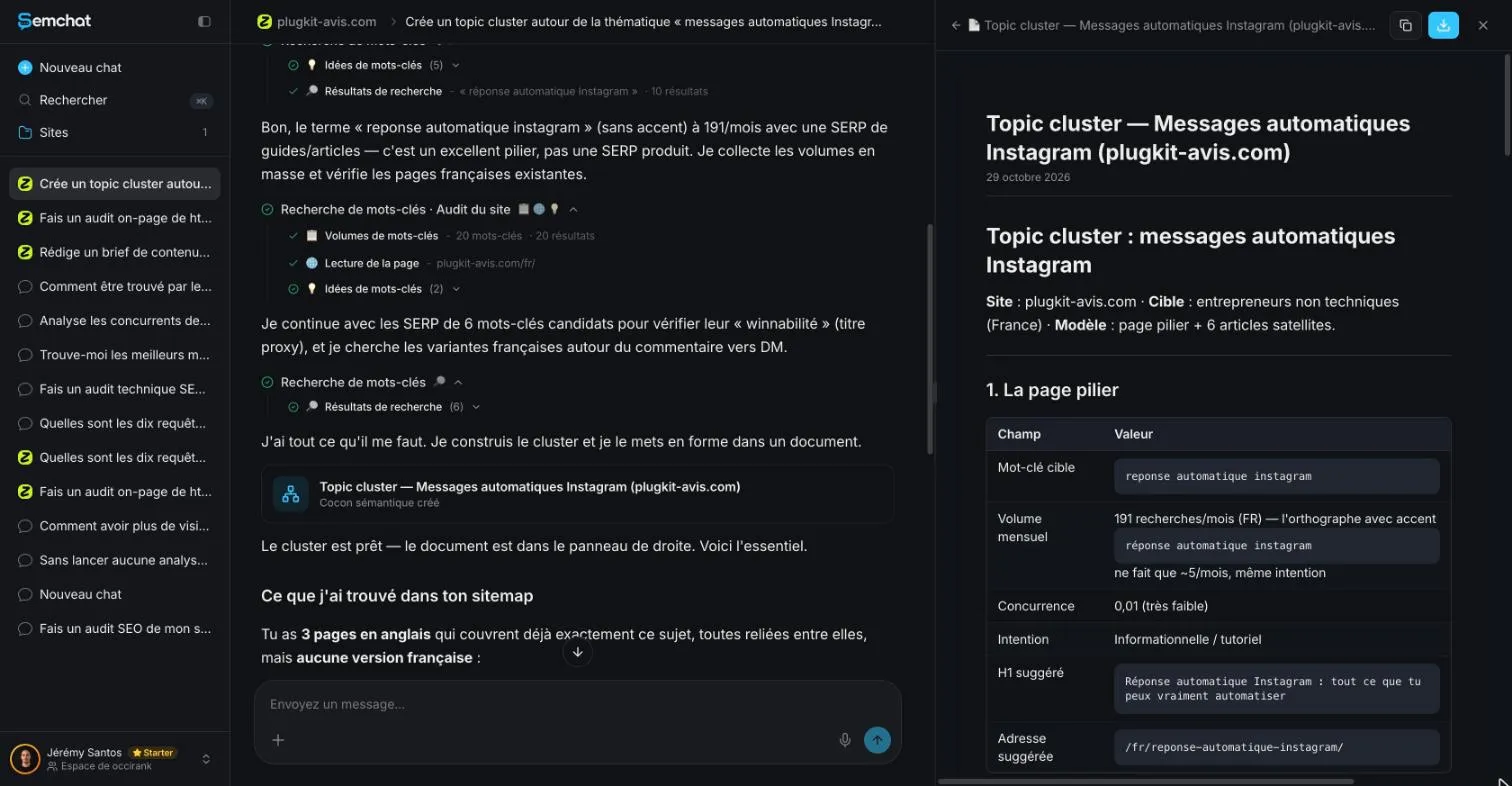
The Topic cluster skill starts from “Crée un topic cluster autour de la thématique” (create a topic cluster around the theme). I asked for a pillar, six articles with their volumes, a sitemap check and the text of each link to the pillar. The plan had the right shape: one pillar page, six articles, a link from each article to the pillar, all filed in a Library document.
But SemChat had only read the English pages of this two-language site. As a result, 3 of the 6 articles already existed in French, the address it suggested for the pillar returned a 404 error while the pillar already existed elsewhere, and the link texts were sentences. Cost: missing data for this test alone, included in the 7.1 points above. The step-by-step test is on our topic cluster tool page.
- Pillar page the broad topic, with a link to each article
- Article on one question link to the pillar, on its keyword
- Article on another question link to the pillar, on its keyword
- Nearby article link to the pillar and to a related article
Internal linking tools: plan your links with a semantic cocoon
Here the skill is called “Cocon sémantique” (semantic cocoon), labelled “façon Bourrelly” (in the style of Laurent Bourrelly) in the list we checked in the app on 29 October 2026. We tested it on 30 October 2026, on the Starter plan. Our internal linking tools page covers the method (a mother page, its daughter pages, links both ways, the target page’s keyword in every link) and the full test.
The sentence, typed in French: “Construis un cocon sémantique pour plugkit-avis.com sur son sujet principal.” (build a semantic cocoon for plugkit-avis.com on its main topic). SemChat picked the right skill on its own. It crawled the whole site (194 pages, no orphan page), mapped its 5,486 links, then pulled the domain’s rankings, volumes for 11 keywords and 4 Google searches. In about 4 minutes it returned a document in 7 parts: diagnosis, 4 silos, a mother page for each silo, the list of links to add with anchor and direction, a work order and a check-in 6 weeks later.
What it got right: it saw that the site’s links come almost entirely from the menu and the footer, and it gives every link a descriptive anchor, “never click here.” What it got wrong, checked on the live site on 30 October 2026: it says no link in the text joins the PlugKit review to the pricing page, when that link exists; and it suggests creating a page on the best time to post on Instagram, which is already live. It also claims to group “your 194 pages into 4 silos” when its silos hold 26. Cost: 4 points of the Starter plan’s quota (66.3%, then 70.3%).
Semantic cocoon and topic cluster: two different skills
Our topic cluster had been filed in a document labelled “Cocon sémantique créé” (semantic cocoon created). The two tests show the difference: Topic cluster suggests a pillar page and its articles; Semantic cocoon starts from the whole site and its real links.
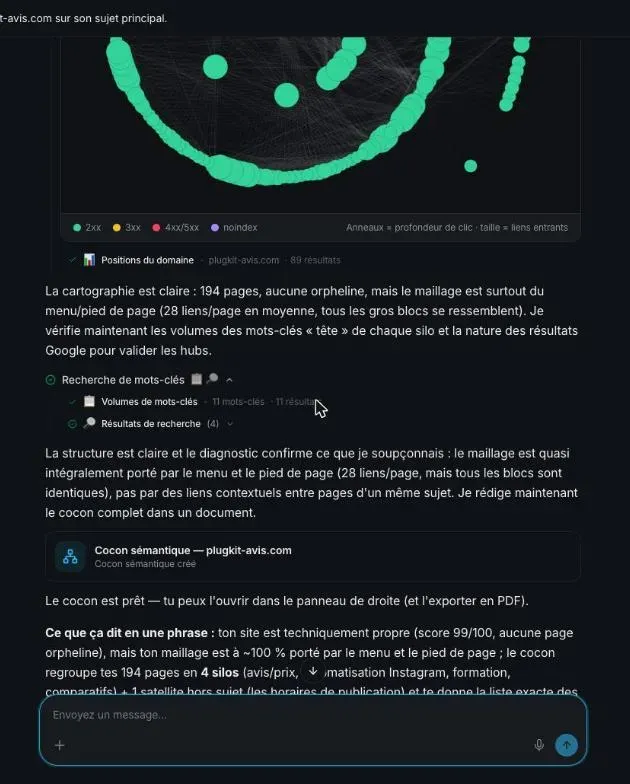
The link-by-link check (pages read, existing pages, addresses, anchors) is on the method page linked above. The takeaway: a “missing” link or a page “to create” gets checked on your live site before you act.
Keyword clustering tools: how SemChat groups keywords by intent
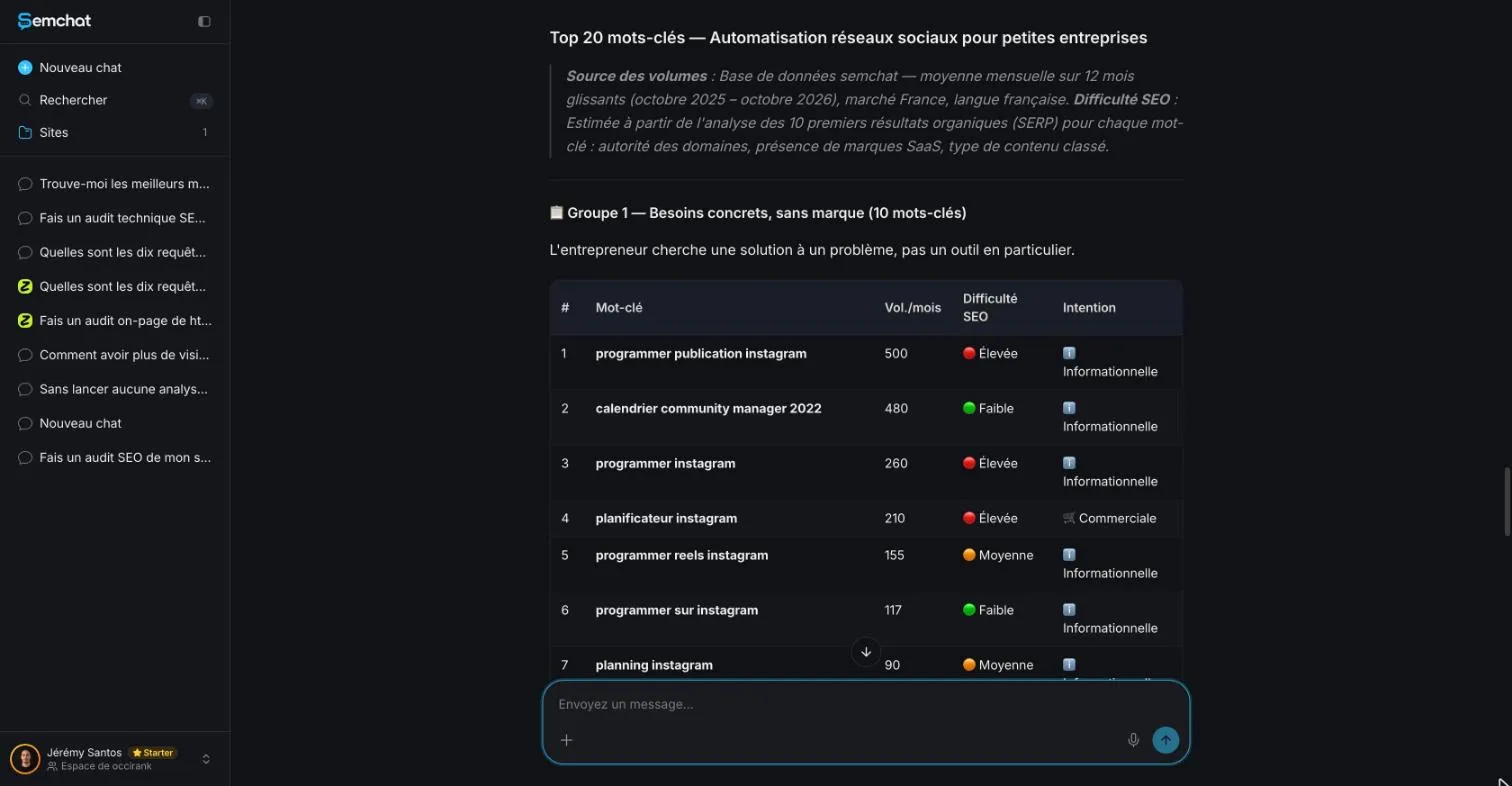
The “Recherche de mots-clés” (keyword research) card on the home screen first returned 15 brand names out of 20, with a difficulty score taken from ad competition. With the keyword clustering skill and a three-point follow-up, SemChat answered “Tu as raison sur les trois points” (you’re right on all three points). It grouped the keywords by intent (unbranded needs, then brands with buying intent) and named the source of its volumes.
Its volumes still strayed from Google Ads: 655 searches a month for “hootsuite gratuit” (hootsuite free) by its count, 140 according to DataForSEO for France. It also kept a dated keyword and suggested pages the site already had. Cost: missing data for this test alone (22.4 points of the Starter plan for two tests together). The full test is on our keyword clustering tools page.
Find and group the keywords worth a page
Group before you write. Two keywords belong together when Google shows the same pages for both, and each group becomes one page. Without that sorting, you may write two pages that compete for the same search.
What the tool doesn’t replace: your own read-through
Across the four tested skills, the same flaws came back. Keep them in mind before you follow a suggestion:
- Volumes often differ from DataForSEO’s Google Ads figures, in both directions. In France, SemChat’s data comes from Haloscan; outside France, from a mix of providers it doesn’t name (email from Haloscan, 29 October 2026). Cross-check every number;
- The brief, the topic cluster and the clustering each suggested a page or a section the site already had;
- The topic cluster only read the English pages of a two-language site;
- Link text came as long sentences, where this site uses the target page’s keyword.
Its two strengths, on the other side: it corrects itself when you point out its errors, and it states its limits, such as having no access to Search Console.
Free AI tools for content writing: what to check before you publish
SemChat has a Free plan at €0, and its pricing page says “Every feature, in every plan.” (read 30 October 2026). Free or paid, Google doesn’t ban AI. Its page on AI content says generative AI “can be particularly useful when researching a topic, and to add structure to original content.” It also warns that “using generative AI tools or other similar tools to generate many pages without adding value for users may violate Google’s spam policy on scaled content abuse” (read 30 October 2026).
Your rule: the tool prepares, you write, you check. Our full test is in our SemChat review, and the plans are on our SemChat pricing page.
An SEO content tool like SemChat saves you the preparation: keyword groups, the plan of your pages, the brief, the list of pages to refresh. Writing and checking stay with you. Start with one page: ask for its brief, check the volumes, the sections and the links, then write.
How to update old blog posts: find the declining ones, then refresh
How to update old blog posts: spot pages in decline, decide what to refresh and what to leave alone, with SemChat's refresh skill. Learn the method. how to update old blog posts
Frequently asked questions
What is SEO content, in plain words?
It's a page written to answer what people search for on Google, in a form Google can understand: the right topic, a clear title, headings, links to your other pages. Google's SEO Starter Guide puts it simply: “Creating content that people find compelling and useful will likely influence your website's presence in search results more than any of the other suggestions in this guide” (read 30 October 2026).
Which AI tool is best for SEO content?
We don't rank tools we haven't tested. We tested SemChat's brief skill on 29 October 2026: a solid 11-part first draft that still needed four fixes. Surfer builds an outline and writing guidelines in its Content Editor, and Frase builds briefs from the pages that rank, according to their sheets dated 29 October 2026; neither has a free plan, only 7-day trials. We haven't tested either of them.
Is SEO dead now that AI writes content?
Google doesn't say so. Its SEO Starter Guide still says that content people find “compelling and useful” will likely matter more than any other suggestion in it, and its page on AI content warns that “using generative AI tools or other similar tools to generate many pages without adding value for users may violate Google's spam policy on scaled content abuse” (both read 30 October 2026). AI can help you prepare; the value still has to come from you.
Where can you check the SEO of a page you wrote?
In Google Search Console, for free. Its Performance report shows the clicks, impressions and average position of each page; Google defines average position as “The average position of the topmost result from your site” (Search Console Help, read 30 October 2026). Compare two periods of the same length to spot a page that's losing clicks.
Let your AI do the chores of getting found online.
10% off your subscription, for life with my link, if you subscribe within 2 weeks of signing up. No code. All about the SemChat promo code
Affiliate link: it costs you nothing extra.
Verified sources
- SemChat pricing: “Every feature, in every plan. Just pick your monthly usage.” (Free €0, Starter €20 /mo) (30/10/2026)
- Google Search Central: SEO Starter Guide, the basics (30/10/2026)
- Google Search Central: guidance on using generative AI content on your website (30/10/2026)
- Search Console Help: Performance report (clicks, impressions, average position) (30/10/2026)
- Surfer: plans, Content Editor and trial (competitor sheet) (29/10/2026)
- Frase: briefs from ranking pages, plans and trial (competitor sheet) (29/10/2026)