Indexing in SEO: how Google stores your pages, and how to check it
Indexing in SEO is the step where Google analyses your page and stores it in its index, a large database. A page that isn't in the index can't appear in Google's search results. To check whether yours is there, the free reference is the URL Inspection tool in Google Search Console. And an indexed page isn't necessarily well ranked: those are two separate steps.
 By Jérémy Santos Updated on 30 October 2026 Tested on his own SemChat account: first audit on 29 October 2026.
 This page is part of the guide: What is Google Search Console

Google’s index, a huge library where your site has to find its shelf. Illustration by Zéro Corvée.
You published a page, and Google doesn’t show it. Before you worry about rankings, one question comes first: is the page in Google’s index? That’s what indexing in SEO is about. This guide explains what “indexed” means, how to check it and what Search Console’s statuses say, based on Google’s own help pages, read on 30 October 2026. If the tool is new to you, start with what is Google Search Console. The SemChat buttons on this page are affiliate links.
Indexing in SEO, explained simply
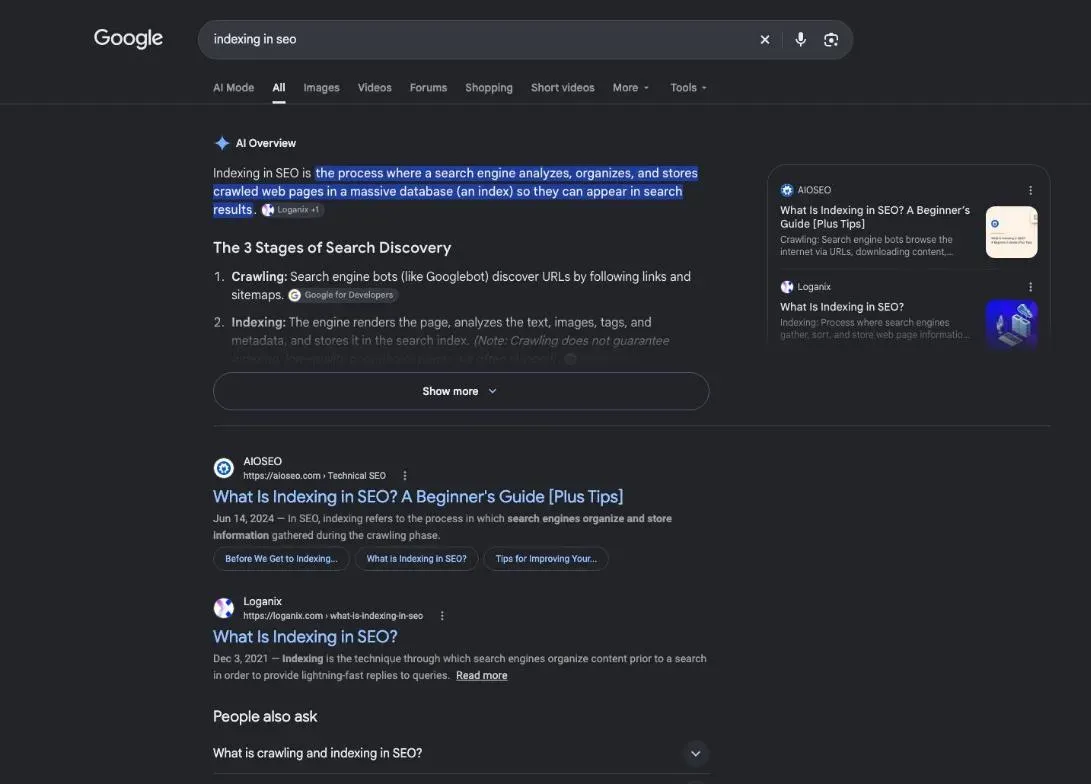
What is indexing in SEO, in one sentence
Google defines it in its guide to how Search works: “Indexing: Google analyses the text, images, and video files on the page, and stores the information in the Google index, which is a large database” (developers.google.com, read 30 October 2026).
Think of a library catalogue. An indexed page has its card: Google knows what’s on it and can suggest it when someone searches. A page missing from the catalogue doesn’t exist for search results, even if it’s live on your site.
Why indexing matters: no index, no visits from Google
The index is where Google looks every time someone searches: “When a user enters a query, our machines search the index for matching pages.” The Search Console help is blunt about the opposite case: “URL is not on Google means that the URL can’t appear in Search results.”
So indexing comes before everything else. Keywords, titles and links do nothing for a page Google hasn’t kept. Once your pages are indexed, the visits they bring are measured in Google Analytics, explained on our page what is GA4.
Crawling, indexing, ranking: how Google processes a page
Google puts it this way: “Google Search works in three stages, and not all pages make it through each stage.” And it adds: “Google doesn’t guarantee that it will crawl, index, or serve your page, even if your page follows the Google Search Essentials.”
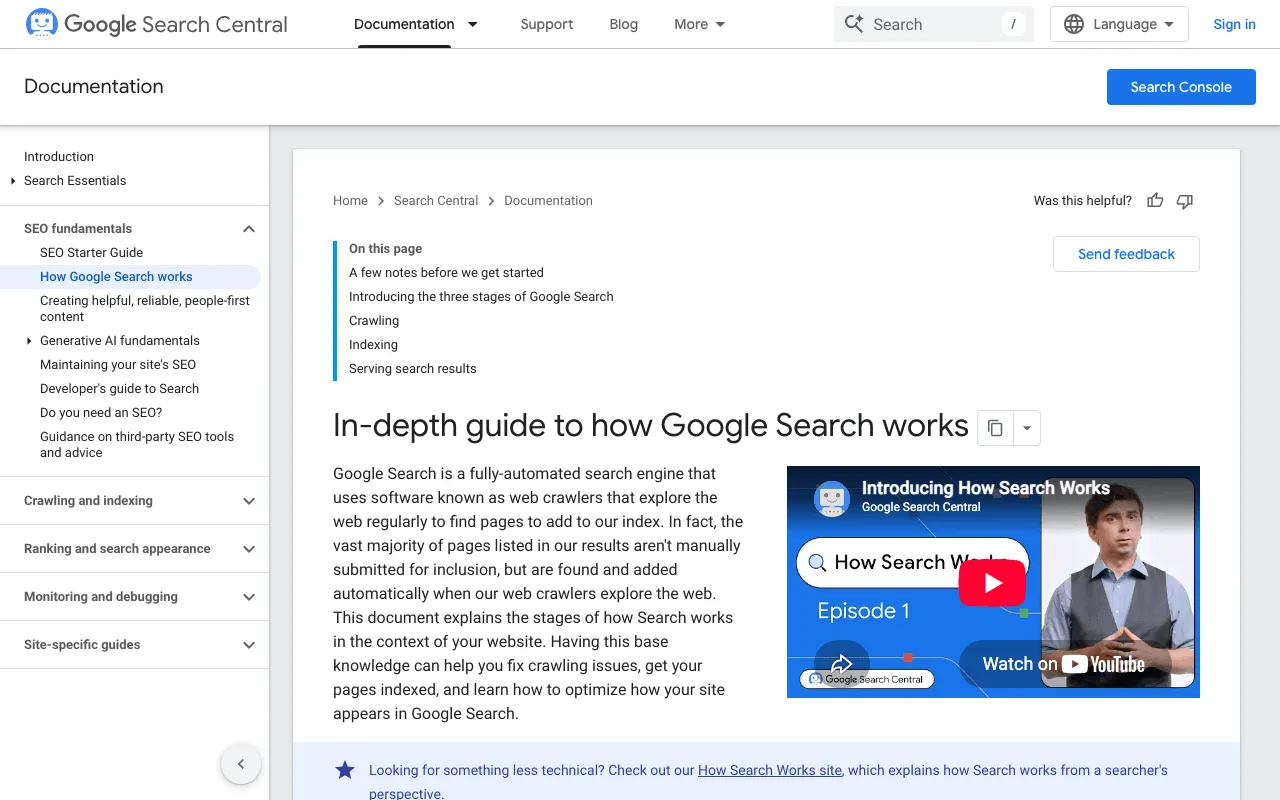
Crawling and indexing in SEO: two different steps
Crawling comes first. There’s no central registry of web pages, so Google keeps looking for new ones. It finds them in two main ways: through a link from a page it already knows, or through a sitemap, the list of pages you send it. The file itself is covered on our page what is a sitemap.
The program that visits pages is Googlebot. During the crawl, Google renders the page and runs its JavaScript with a recent version of Chrome, “similar to how your browser renders pages you visit.” Without rendering, Google says, it “might not see that content.” Some pages never get crawled: the site owner blocked them, or they need a login.
Indexing comes second. Google analyses what it fetched and decides what to store.
- 1 Crawl Googlebot visits the page and downloads its content.
- 2 Index Google analyses the page and stores it in its index.
- 3 Rank and serve For each search, Google picks the pages to show.
This order explains Search Console’s vocabulary. “Discovered”: Google knows the address. “Crawled”: it visited the page. “Indexed”: it kept it. A page can stop at any step.
Filing the page in Google’s index
During indexing, Google processes the text and key tags such as the <title> element and image alt attributes. It also groups pages with similar content and picks the most representative one, the canonical: “the page that may be shown in search results.” The others become alternate versions.
Google adds: “Indexing isn’t guaranteed; not every page that Google processes will be indexed.” Google lists three common indexing issues:
- the quality of the content on the page is low;
- robots meta rules disallow indexing;
- the design of the website makes indexing difficult.
And there’s no paid shortcut. Google “doesn’t accept payment to crawl a site more frequently, or rank it higher.”
Ranking comes later: indexed doesn’t mean visible
Google says so directly: “Search Console might tell you that a page is indexed, but you don’t see it in search results.” Its reasons: the content is irrelevant to people’s queries, the content quality is low, or robots meta rules prevent serving.
And when your page does show, its place depends on who’s looking. Don’t mix up three numbers:
- Your own search: Google customises results for each user’s search history, location and other variables. What you see isn’t what your customers see.
- Search Console’s average position: the average of your link’s position across all impressions. Google itself cites a page at position 5 in the report that its owner finds at position 8 when searching (help page read 30 October 2026).
- An SEO tool’s reading: a measurement taken by a third-party tool, on a given date, from a given country.
Ranking is a topic of its own. Here, we stay on the step before it: getting into the index.
How to check whether a page is indexed
The URL Inspection tool, one page at a time
This is the tool for a specific page. Google describes it this way: “The URL Inspection tool provides information about Google’s indexed version of a specific page, and also allows you to test whether a URL might be indexable.” Paste your page’s full address into the bar at the top of Search Console and read the verdict:
- “URL is on Google”: the page is eligible to appear in search results, but isn’t guaranteed to be there.
- “URL is not on Google”: the page can’t appear in search results. The Page indexing section tells you why.
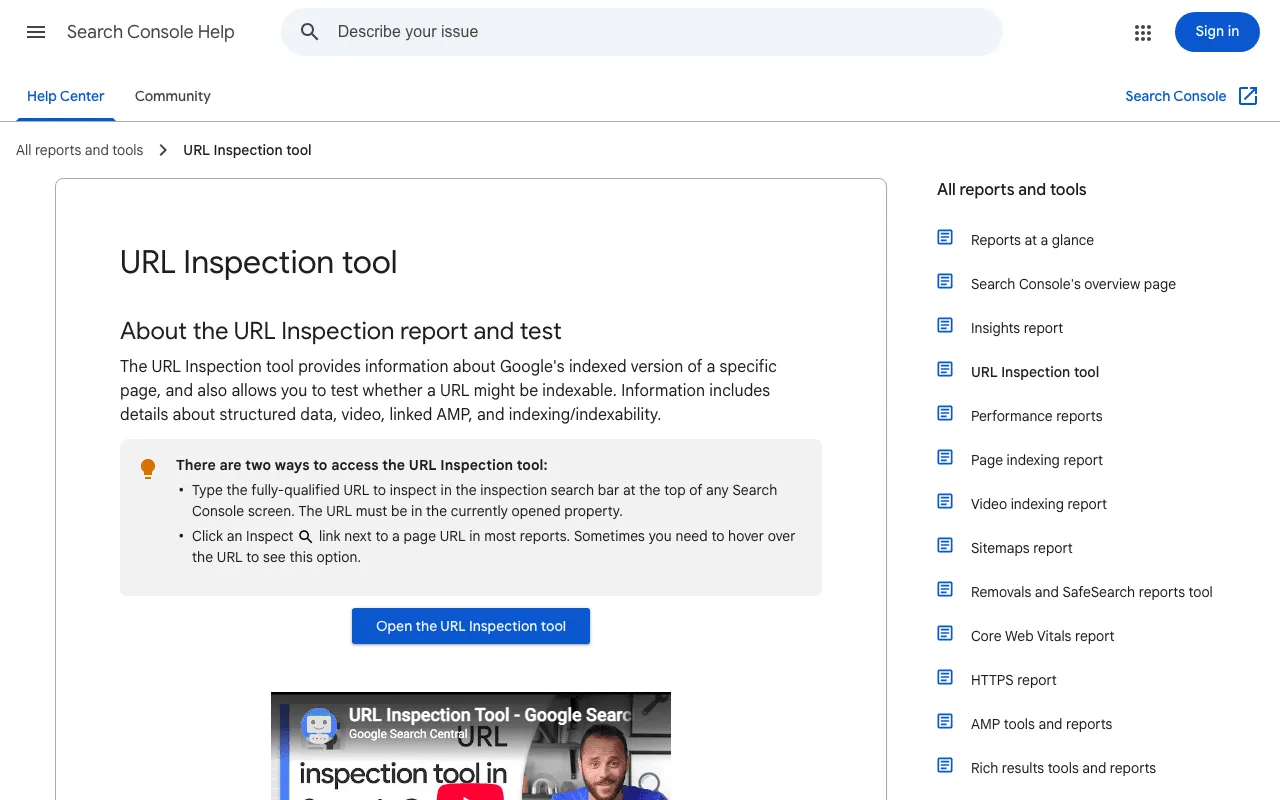
Three details from the help page. The result is “not a live test”: it shows the last indexed version, and a Live Test button checks the current page. The report also shows how Google found the URL, when it crawled it and which canonical it chose. And there’s a daily limit of inspections for each property you own.
One label matters for new pages: “URL is unknown to Google” means Google hasn’t seen that URL before. Requesting indexing is a separate how-to, covered on our page how to index a website on Google.
No Search Console yet? Type site: followed by your domain into Google, such as site:example.com. It’s quick but rough: Google says an indexed URL can show up in site: results, “however it’s not guaranteed,” and the list “is not always exhaustive.”
The page indexing report, for the whole site
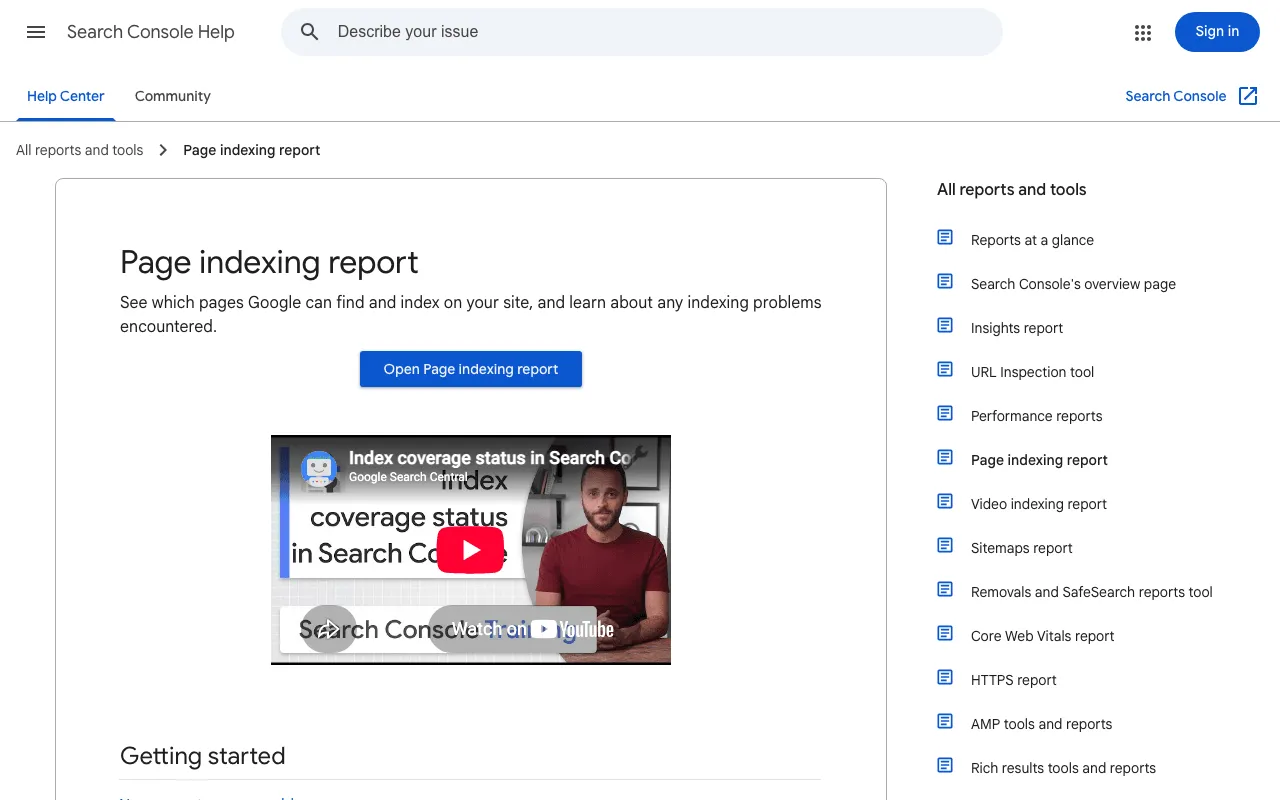
For the big picture, the Page indexing report “shows the Google indexing status of all URLs that Google knows about in your property.” A chart splits indexed and not indexed pages, and a “Why pages aren’t indexed” table gives each reason. Its Source column tells you who can fix it: “In general, you can fix only issues where the source is listed as ‘Website’.”
Two limits. You can’t search or filter the report by URL; for one page, go back to URL Inspection. And for small sites, Google is frank: “If your site has fewer than 500 pages, you probably don’t need to use this report.” It suggests site: searches on your key pages, homepage included, instead.
Search Console indexing statuses, in plain English
First reflex: don’t panic at the grey. Google’s advice: “Remember that Not indexed is not necessarily bad. Examine the reason given for not indexing a given URL.”
Crawled or discovered, currently not indexed
Two neighbouring statuses, two different situations:
- Discovered - currently not indexed: “The page was found by Google, but not crawled yet.” Google wanted to crawl it but rescheduled, so as not to overload your site.
- Crawled - currently not indexed: “The page was crawled by Google but not indexed. It may or may not be indexed in the future; no need to resubmit this URL for crawling.”
What causes the second one, and what you can do about it, is covered on our page crawled, currently not indexed.
Excluded by a noindex tag or blocked by robots.txt
A noindex tag tells Google not to index a page. If you meant it, Google’s help is almost cheerful: “If you do not want this page indexed, congratulations!” If you didn’t, remove the tag.
A robots.txt rule blocks crawling, not indexing. Google warns that it “does not guarantee that the page won’t be indexed through some other means.” Worse, it stops Google from reading a noindex tag on that page. Hence its rule: “To ensure that a page is not indexed by Google, remove the robots.txt block and use a ‘noindex’ directive.” To check robots.txt, noindex tags and the other blocks across your whole site, follow our technical SEO checklist.
Should every page of your site be indexed?
No. Google asks the question in its own help, “Is it OK if a page isn’t indexed?”, and answers: “Absolutely.” Its advice: “Don’t expect every URL on your site to be indexed. Some URLs might be duplicates or might not contain meaningful information. Just be sure that the key pages on your site are indexed.”
Thin or duplicate pages Google may skip
When two addresses show nearly the same content, Google keeps one. The report then says “Duplicate without user-selected canonical” or “Duplicate, Google chose different canonical than user.” About the first, Google writes: “This is not an error, but is working as intended, because Google does not serve duplicate pages.”
Google’s own example comes from online stores: pages that filter or sort the same products, with parameters like “type=dress or colour=green or sort=price” in Google’s example, are labelled duplicate or alternate, and Google doesn’t index duplicate copies. Pages with little content run into the low-quality issue from Google’s list above. The fix isn’t technical: give each page a reason to exist.
Removed pages and pages you hid on purpose
Some unindexed pages are fine as they are:
- Removed pages: “404 responses are not necessarily a problem, if the page has been removed without any replacement.” If a page moved, use a 301 redirect.
- Pages you blocked: Google notes that “URLs blocked by robots.txt are probably intentionally blocked.”
- Pages with a noindex tag you added yourself.
So make a short list: homepage, service or product pages, the pages that bring you customers. Check those one by one.
Indexable pages or indexed pages: the difference on a real audit
Two words look alike, and tools blur them. An indexable page is one nothing prevents from being indexed: it loads normally, with no noindex and no block. An indexed page is one Google actually kept. Only Search Console can tell you the second.
I saw it on a real site on 29 October 2026: plugkit-avis.com, my affiliate site, so new that its Search Console only had data from 24 October 2026. SemChat’s interface is in French. Its “Visibilité des pages” (page visibility) tab said “Tout est bon” (all good): 189 pages checked, 189 visible in search, 0 hidden. Visible in SemChat’s sense, meaning nothing hidden. Not necessarily indexed.
Then I ran SemChat’s Indexing skill, connected to my Search Console, and asked it to list the pages Google hadn’t indexed, sorted by cause. It inspected 5 URLs: all 5 were indexed. Its first diagnosis was wrong, though. It claimed about 70 English pages had 0 impressions and considered setting them to noindex, while the manychat-pricing page already had roughly 27 to 30 impressions. It also called 104 duplicate H1 headings “generic content”: they were 52 pairs of US and UK English pages.
When I pushed back, it admitted: “J’avais tort sur trois points” (I was wrong on three points). Its corrected card counted 93 pages with at least one impression and 4 pages unknown to Google, over 5 days of data.
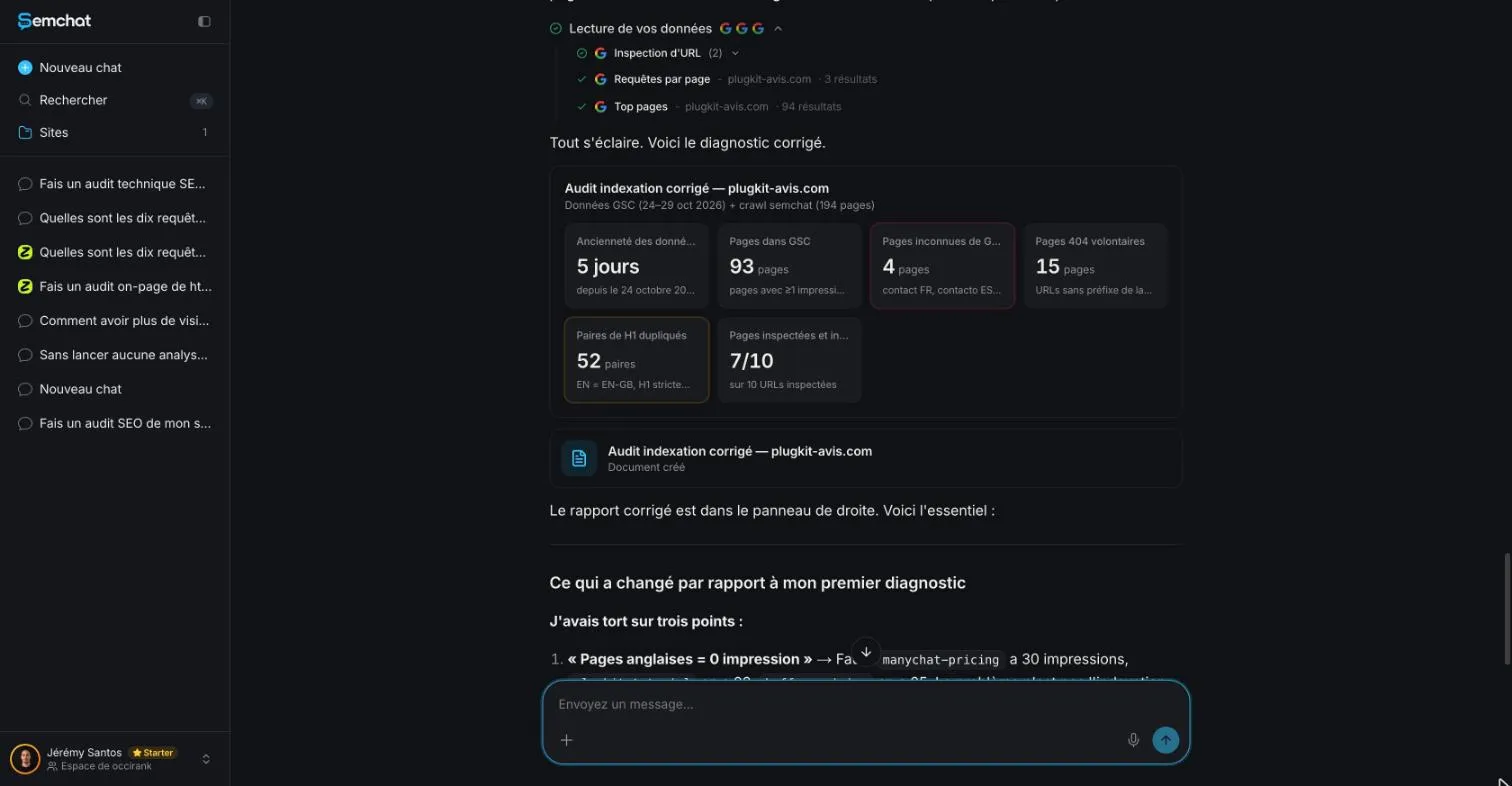
I checked everything. URL Inspection did report /fr/contact/ and /pt-br/contato/ as “URL is unknown to Google,” even though both were in the sitemaps. But two other “unknown” pages on its list returned a 404 with a noindex tag: they were never meant to be indexed. SemChat also counted about 170 pages in the sitemaps, while the sitemap index listed 194.
Its final actions still held three mistakes: add /fr/contact/ to the sitemap (it was already there), add those two 404 pages, and create a sitemap for UK English (it already existed, with 51 URLs). The lesson: SemChat sorts fast and can correct itself, but check every action in Search Console before you act on it.
What the SemChat audit of plugkit-avis.com counted
The same day, I asked SemChat for a full SEO audit of the site in one sentence. Among its key figures was a card reading “Pages indexables : 189 pages, toutes en 200” (indexable pages: 189 pages, all returning 200). A 200 status means the page loads normally. So that number says 189 pages are ready to be indexed. It doesn’t say how many Google kept.
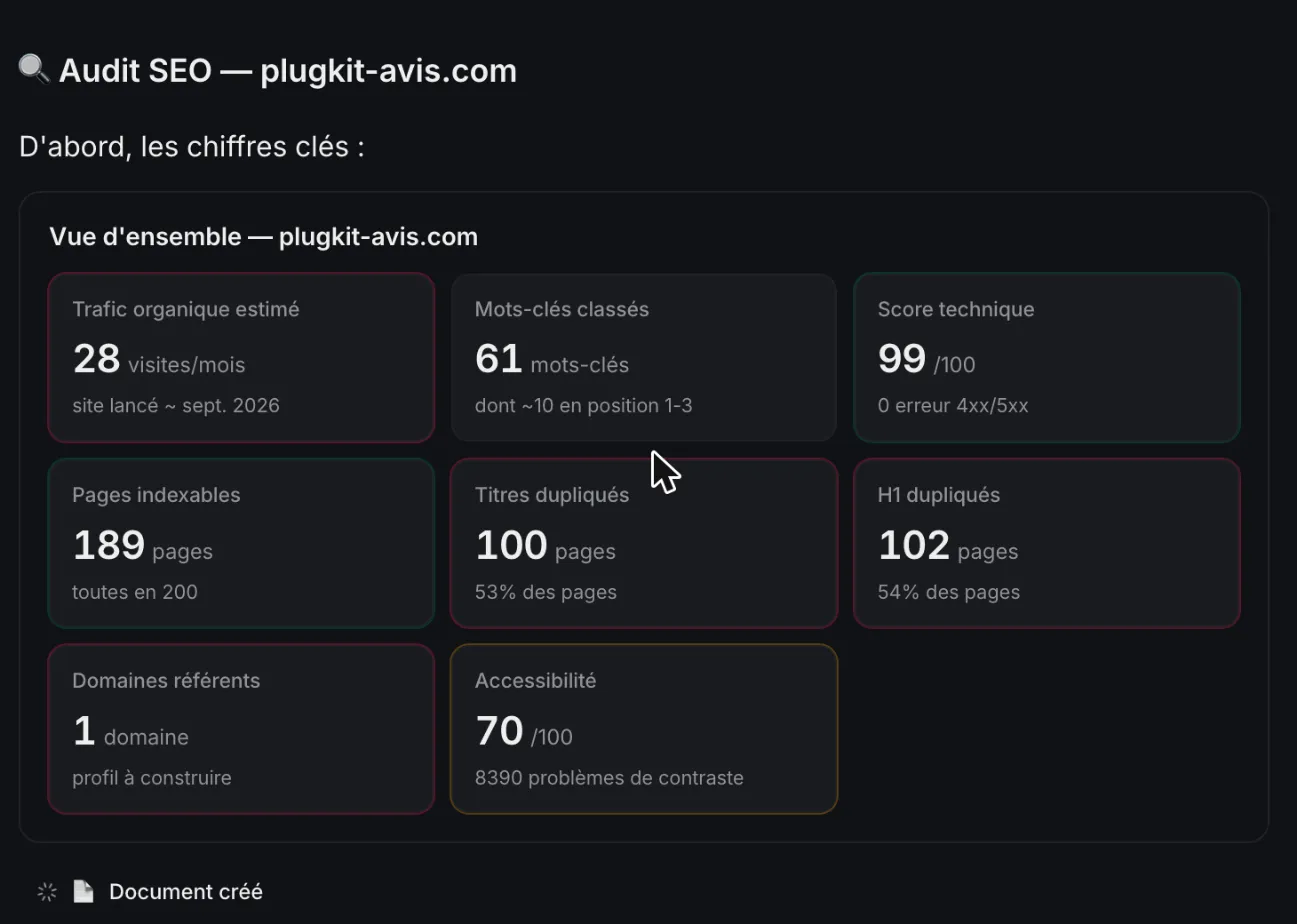
One cost to know: that single full audit used up 100% of the Free plan’s monthly quota. My full test is in the SemChat review, and the plans are on the SemChat pricing page.
Once your key pages are indexed, the next question is what they bring you. A website traffic checker gives you an outside estimate; Google Analytics gives you your own numbers.
Indexing in SEO comes down to three ideas. Indexed means Google kept the page, not that it ranks. URL Inspection in Search Console is the reliable check for a single page. And a page that isn’t indexed is only a problem if it should be. Start today by inspecting your homepage.
Frequently asked questions
How do you get a page indexed faster?
Make sure Google can find it, through a link from a page it already knows or a sitemap. Then request indexing with the URL Inspection tool in Search Console; you must be an owner or full user of the property. Google warns that there's a quota for individual URLs, that requesting a recrawl multiple times for the same URL won't get it crawled any faster, and that crawling can take anywhere from a few days to a few weeks (Google Search Central, read 30 October 2026).
Does indexing still matter with AI search?
Yes. Google writes that to be eligible as a supporting link in AI Overviews or AI Mode, a page must be indexed and eligible to be shown in Google Search with a snippet. It also says there are no additional requirements to appear in those AI features (Google Search Central, AI features and your website, read 30 October 2026).
Where does ranking start once a page is indexed?
At the serving stage. When someone searches, Google looks for matching pages in its index and returns the ones it believes are the highest quality and most relevant. Relevancy is determined by hundreds of factors, which can include the searcher's location, language and device. Being indexed only makes a page eligible (Google's guide to how Search works, read 30 October 2026).
How long does Google take to index a new page?
Google's Page indexing help says it can take a week or so for Google to start crawling and indexing a new page or site. After an indexing request, the URL Inspection help says indexing can take up to a week or two. And indexing is never instant, even when you submit a crawl request directly (Search Console Help, read 30 October 2026).
Let your AI do the chores of getting found online.
10% off your subscription, for life with my link, if you subscribe within 2 weeks of signing up. No code. All about the SemChat promo code
Affiliate link: it costs you nothing extra.
Verified sources
- Google Search Central: In-depth guide to how Google Search works (30/10/2026)
- Search Console Help: Page indexing report (30/10/2026)
- Search Console Help: URL Inspection tool (30/10/2026)
- Google Search Central: Ask Google to recrawl your URLs (30/10/2026)
- Google Search Central: site: search operator (30/10/2026)
- Search Console Help: What are impressions, position, and clicks? (30/10/2026)
- Google Search Central: AI features and your website (30/10/2026)
- SemChat pricing (Free plan, Starter plan) (29/10/2026)