What is on-page SEO? Everything you set on the page itself
What is on-page SEO? It's everything you set on the page itself so Google understands it and people want to click: the title, the description, the headings, the text, the images and the links. None of it can be bought: Google says it “doesn't accept payment to rank pages higher.” All of it can be checked, one page at a time.
 By Jérémy Santos Updated on October 30, 2026 Tested on his own SemChat account: first audit on October 29, 2026.
 This page is part of the guide: website optimization
What you set on the page itself, from the title to the images. Illustration by Zéro Corvée.
You have a website. You have products, services, maybe a blog. And Google still shows your competitors first. Before you pay anyone, look at the page itself. That’s where on-page SEO starts.
This page walks you through each setting, using Google’s own documentation, read on October 30, 2026. For the full picture, links from other sites included, see our page on website optimization. The SemChat buttons on this page are affiliate links.
What is on-page SEO, in plain English
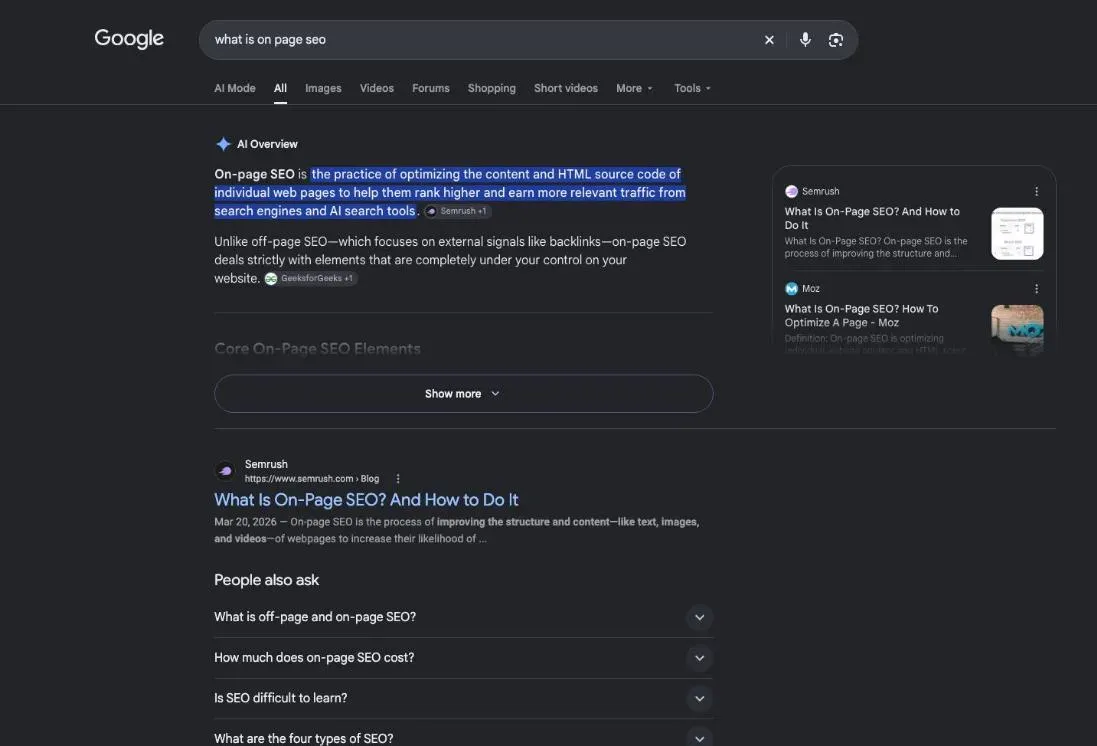
What is on-page SEO? It’s every change you make inside your own pages so they answer a search better. “On-page” means on the page, as opposed to what happens elsewhere, on other websites.
Google describes SEO as helping search engines understand your content, and helping people find your site and decide whether to visit it (SEO Starter Guide, read October 30, 2026). On-page work does both at once: it helps Google read your page, and it helps a person pick your result. If the word itself is new to you, start with the short answer on SEO meaning.
This page targets “what is on page seo,” a query typed about 480 times a month in the US (DataForSEO, October 29, 2026). That’s the question this whole page answers.
On page SEO: everything you set on the page itself
On page SEO is the part of search optimization you control alone, from your site editor. Six things to set:
- the title tag, the blue headline Google shows in its results;
- the meta description, the short text that may appear under it;
- the headings that break up your text;
- the page URL;
- the images and their alt text;
- the links to your other pages.
And above all, the text itself. Google puts it plainly: content people find compelling and useful “will likely influence your website’s presence in search results more than any of the other suggestions in this guide.”
On-page, off-page and technical SEO: the difference
SEO is often split into three areas:
- On-page: what’s written and set on your page.
- Off-page: what other sites say about you, mostly the links they point at your pages. Those are backlinks, and they’re a separate job.
- Technical: what lets Google reach your page and read it (crawling, speed, mobile display).
| On-page | Off-page | Technical | |
|---|---|---|---|
| Where it happens | on your page | on other sites | in how the site works |
| Examples | title, text, images, internal links | links from other sites | crawling, speed, mobile display |
| Who acts | you, in your editor | other site owners | you, your site builder, your host |
Why on-page SEO matters for your site
Because it’s the one lever that depends only on you. And because Google reads your page before deciding who to show it to.
In search results, your title is often the only thing people read about you. Google says the title link is “often the primary piece of information people use to decide which result to click” (title link documentation, read October 30, 2026). A vague title, and the click goes next door.
It also costs nothing per click. Google says it “doesn’t accept payment to crawl a site more frequently, or rank it higher” (how Search works, read October 30, 2026). And it warns there are “no secrets here that’ll automatically rank your site first in Google (sorry!).” Changes take time to show, too: Google has to recrawl a page, which “may take a few days to a few weeks.”
On page SEO techniques: the parts to set on every page
Here are the on page SEO techniques that apply to every page, in the order I’d check them.
- 1 Title tag The headline shown in search results.
- 2 Meta description The summary that may appear under it.
- 3 Headings One main heading, then the sections.
- 4 URL Readable words, separated by hyphens.
- 5 Images Sharp, near related text, with alt text.
The title tag and the meta description
The title tag is your page’s title, written in its code. Of all the sources Google uses to build the blue headline of your result, it comes first: “Content in <title> elements.”
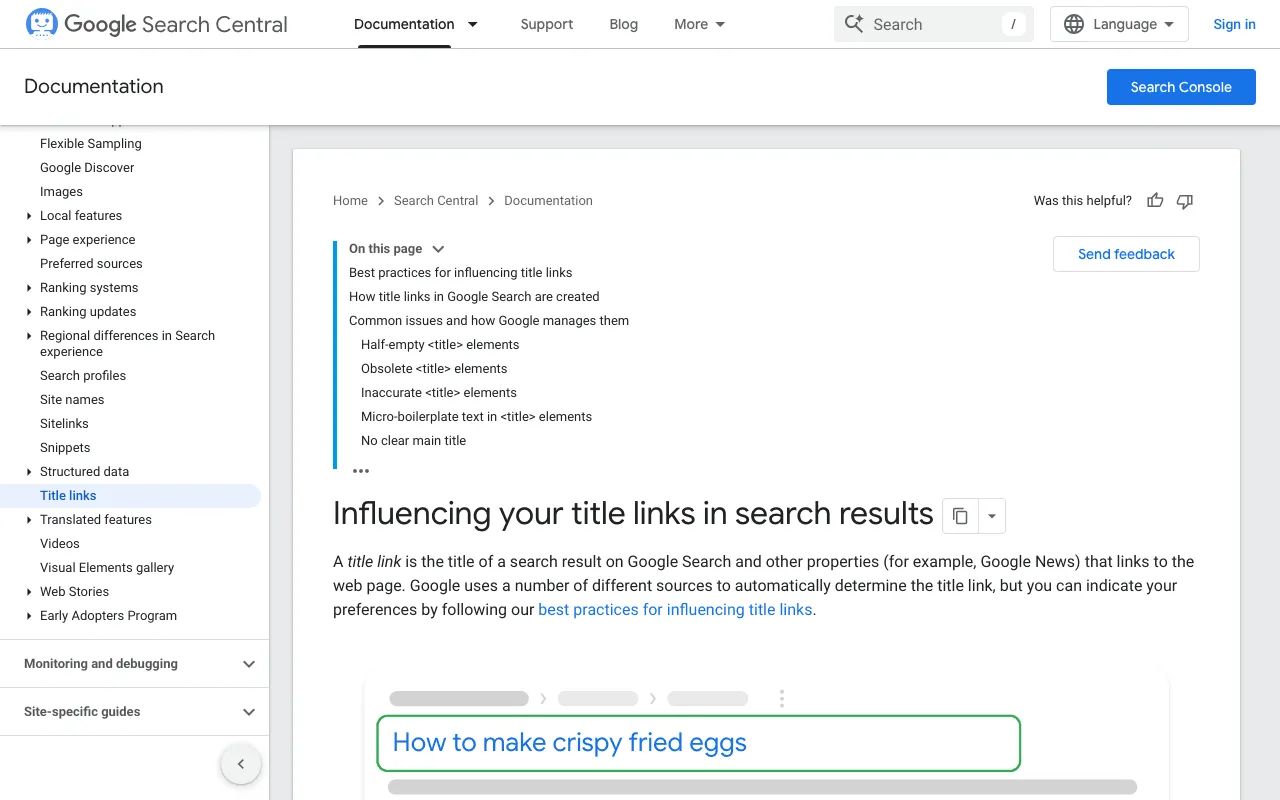
Google’s ground rule: “It’s important to have distinct text that describes the content of the page in the <title> element for each page on your site.” One title per page, different from the others, with no keyword pile-up. Length, keyword placement and what to do when Google rewrites your headline are covered on our SEO title page.
Under the title, Google shows a short text called a snippet. You don’t always choose it: “Snippets are primarily created from the page content itself.” Google sometimes uses your meta description instead, “if it might give users a more accurate description of the page than content taken directly from the page” (snippet documentation, read October 30, 2026). Write one anyway: an honest summary, unique to the page. How long it should be is covered on our meta description length page.
Headings that organize the text
Headings split your text. The H1 is the main heading at the top; H2s open the big sections, H3s the subsections. Google asks you to “Make it clear which text is the main title for the page.”
The order? From Google Search’s perspective, “it doesn’t matter if you’re using them out of order.” A logical order still helps screen reader users. On how many to use, Google says there’s no ideal number, and adds: “if you think it’s too much, then it probably is.”
The page address
The URL can show up in search results as a breadcrumb. Google recommends readable words rather than long ID numbers, and “using hyphens (-) instead of underscores (_) to separate words in your URLs” (URL structure page, read October 30, 2026).
Don’t expect a miracle, though. Keywords in the domain name or URL path “alone have hardly any effect beyond appearing in breadcrumbs,” says Google. A clear URL mostly helps your reader.
Images, file names and alt text
Google asks you to “Use images that are sharp and clear, and place them near text that’s relevant to the image.” Alt text is a short description of the image; Google calls it “a short, but descriptive piece of text that explains the relationship between the image and your content.”
For a photo of a scented candle, “Fig-scented candle in an amber glass jar” says more than “IMG_2041.” Same for the file name: “use filenames that are short, but descriptive” (Google Images page, read October 30, 2026).
Keywords placed where readers expect them
Pick one main keyword per page: the phrase your customer types, not your industry jargon. Google gives the example of two people who want the same thing, one searching “charcuterie,” the other “cheese board.” Its language matching systems, it says, “are sophisticated,” so you don’t need every variant.
Repeating your keyword everywhere won’t help. Google: “Excessively repeating the same words over and over (even in variations) is tiring for users, and keyword stuffing is against Google’s spam policies.” And forget the old keywords meta tag: “Google Search doesn’t use the keywords meta tag.”
The rule this site follows (ours, not Google’s): the keyword in the title, the main heading, the URL and the first paragraph, then a few natural mentions in the text. No more. Before writing, put your keyword, your readers’ questions and the competing pages into a content brief.
10% off your subscription, for life with my link, if you subscribe within 2 weeks of signing up. No code. All about the SemChat promo code
Try SemChat for free Free plan, no credit card. Affiliate link: it costs you nothing extra.
Content and links on the page
Helpful content, kept up to date
Your text has to answer what the person was looking for, early. Google lists what it looks for: “The text is easy-to-read and well organized,” “The content is unique,” “The content is up-to-date,” “The content is helpful, reliable, and people-first.”
Length alone does nothing: “The length of the content alone doesn’t matter for ranking purposes.” And pages age. Google’s advice: “Check in on previously published content and update it as needed, or even delete it if it’s not relevant anymore.” The full method, from outline to final read, is on our SEO content writing page.
Links to your other pages and to trusted sources
An internal link goes from one of your pages to another. It keeps readers moving and helps Google find your pages. Google: “Every page you care about should have a link from at least one other page on your site.”
The clickable words matter. Google: “Good anchor text is descriptive, reasonably concise, and relevant to the page that it’s on and to the page it links to” (link best practices, read October 30, 2026). “Click here” says nothing; “our fig candles” says everything. Linking out to a trusted source when you state a fact helps your reader check it. The method has its own page: internal linking SEO.
Proof of experience on the page
Google groups its trust signals under E-E-A-T: experience, expertise, authoritativeness, and trustworthiness. It adds: “Of these aspects, trust is most important” (helpful content page, read October 30, 2026). It isn’t a hidden setting. Asked whether E-E-A-T is a ranking factor, Google answers: “No, it’s not.” On your page, it shows as your name, your real experience and your sources. More on our EEAT meaning page.
Beyond the basics: speed, mobile display, structured data
On page optimization of speed and Core Web Vitals
Strictly speaking, speed is technical SEO, but you’ll see it in any on page optimization checklist. Google measures the loading experience with three signals, the Core Web Vitals. Its targets for a good experience (read October 30, 2026):
- the largest visible element should load “within the first 2.5 seconds of the page starting to load”;
- for responsiveness, aim for “an INP of less than 200 milliseconds”;
- for visual stability, “a CLS score of less than 0.1.”
You don’t need to memorize these. Search Console tracks them for you, on mobile and desktop.
Mobile display and structured data
Check your page on a phone: no pop-up hiding the text, buttons you can tap, text you can read without zooming. Google asks site owners to avoid ads and interstitials that make the site hard to use.
Structured data is code that labels your content (a product, a review, a recipe) for search engines. Google lists WebSite structured data among the sources it reads to pick a title link. Most site owners can leave it to their site builder or SEO plugin.
Check your pages one by one: a checklist and a real audit
An on-page audit means reading a page against a checklist, then fixing things in order. You can do it alone with Search Console, or ask an assistant like SemChat. Either way, you decide what to apply.
My checklist, page by page:
- Title tag: unique, clear, with the keyword.
- Meta description: a summary unique to the page.
- Main heading: says the same thing as the title tag.
- Subheadings: they split the answer, no filler.
- URL: readable words.
- Images: sharp, with alt text.
- Internal links: from related pages to this one, and back.
- Facts: prices, dates and figures still accurate.
Duplicate titles: the real case of plugkit-avis.com
plugkit-avis.com is my other affiliate site, in five languages. On October 29, 2026, I asked SemChat for a full audit in one sentence. Its diagnosis: duplicate titles on 100 pages (53% of the site) and duplicate main headings (H1) on 102 pages (54%), caused by the language versions.
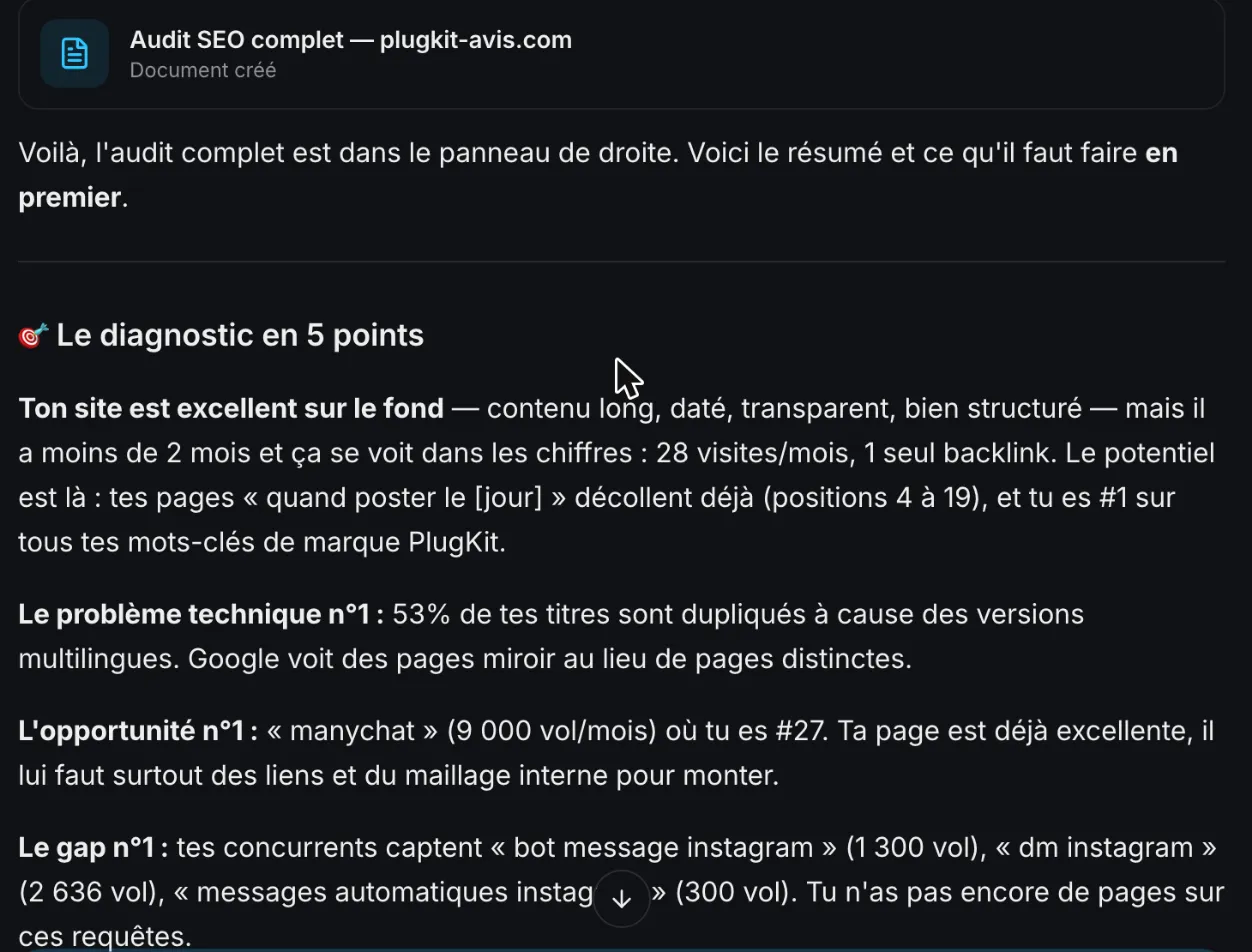
I checked it the same day with curl. The finding was accurate: the US English review page and its UK English version had the same title tag. But those two pages are declared to Google as variants of each other (hreflang tags), so SemChat’s word, “pages miroir” (mirror pages), went too far. The flag was still useful: two identical titles help no one choose.
On October 30, 2026, I pulled the title and H1 of all 194 URLs in the plugkit-avis.com sitemaps. Only one title is still shared, between the site root and the French home page; the UK review page now has “UK” in its title tag. The H1s are still identical on 104 pages, 100 of them in US and UK English pairs. The title tag, which Google shows, was the more urgent fix.
SemChat’s on-page audit, tested: what it caught and what it missed
SemChat is an SEO assistant you talk to: you type a sentence, it reads your pages and search data, then answers. One of its 17 skills is an on-page audit against the top 10 results (app review, October 29, 2026).
I tested it on October 29, 2026, on one plugkit-avis.com page, about the best times to post on Instagram. I asked for an on-page audit on that keyword, a comparison with Google’s top 10 (titles, headings, content) and three fixes at most, each with the exact text to change and where the idea came from.
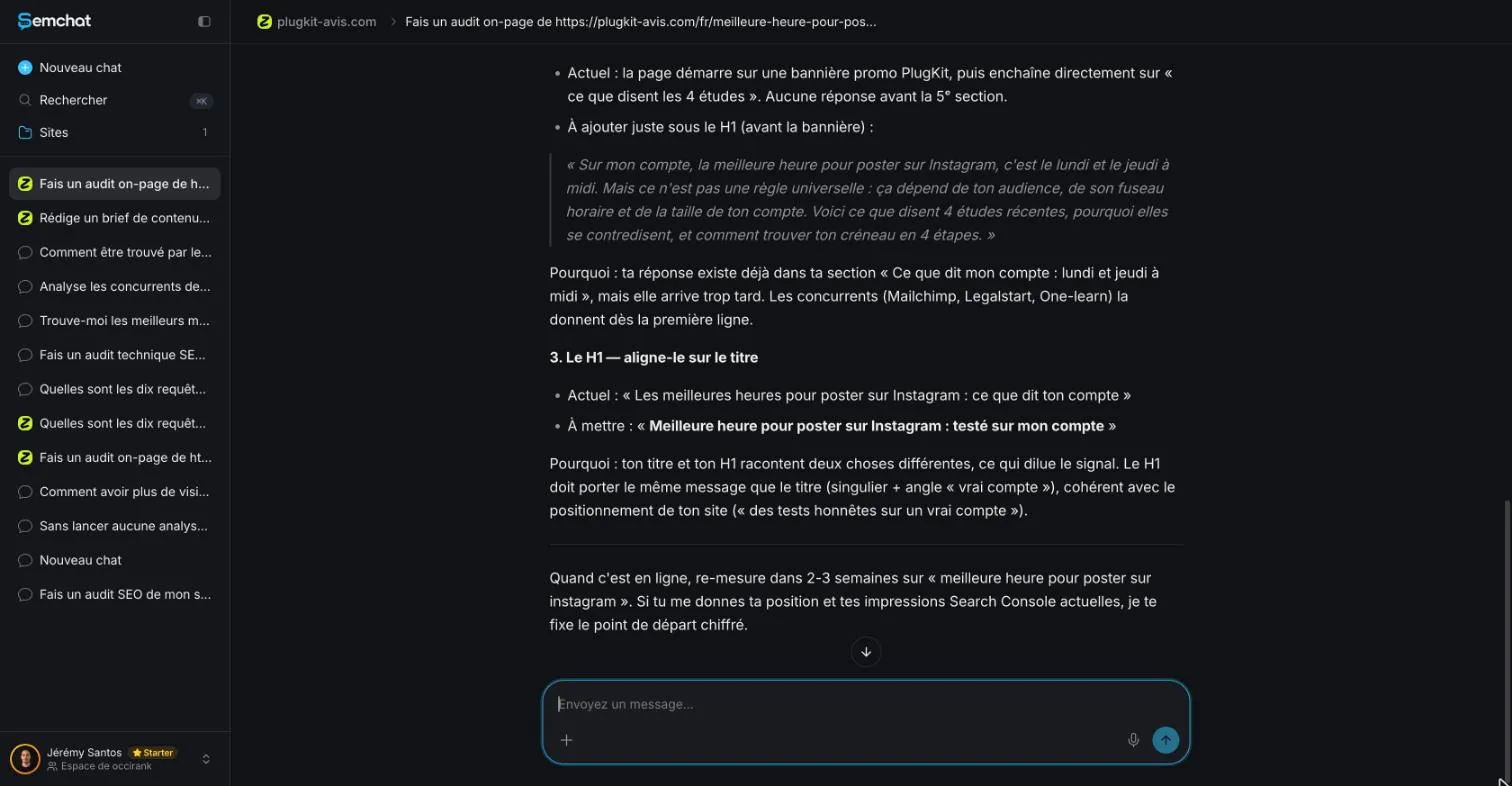
What it caught:
- The title tag and the H1 disagreed. Title: “Meilleures heures pour poster sur Instagram : 4 études” (Best times to post on Instagram: 4 studies). H1: “Les meilleures heures pour poster sur Instagram : ce que dit ton compte” (The best times to post on Instagram: what your account says). Two promises for one page. Checked: true.
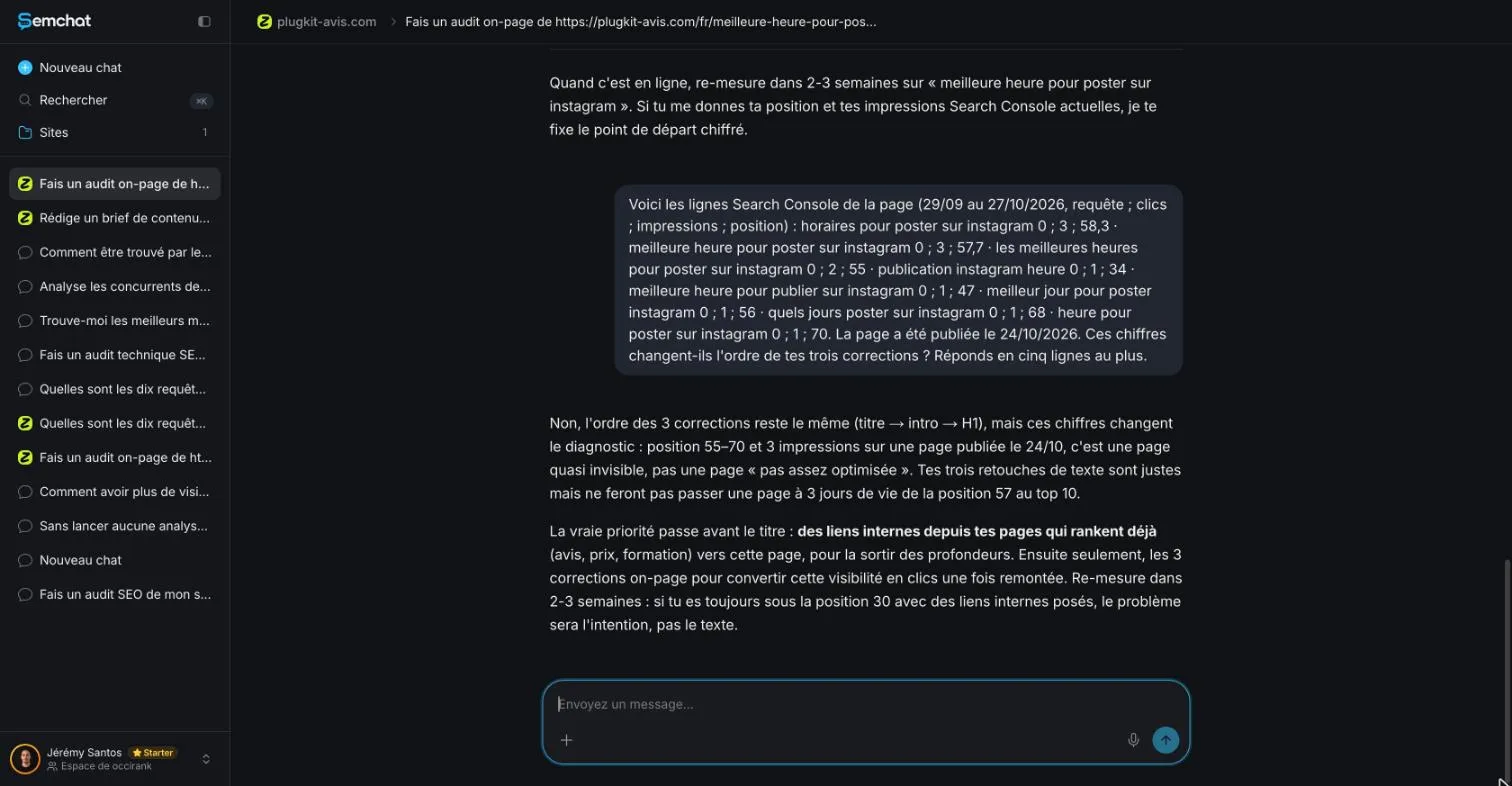
- Internal links first. With the Search Console lines pasted in, it changed its priority: links from pages that already rank (the review, the training page), before any text change. Checked: 13 French pages linked to the audited page, neither of those two.
What it missed:
- it said it never received the attached Search Console export, so I had to paste the lines as text;
- it blamed the page for a promo banner that sits at the top of the whole site;
- its suggested answer sentence (Monday and Thursday at noon) erased a limit stated on the page: my data compared days, not hours;
- it didn’t see the 11 related-page cards tagged as H2s at the bottom;
- it said 4 of the top 10 titles included 2026, while DataForSEO’s check the same day found 2 of 8;
- it summed up the rankings as 55 to 70, the range of the main queries, when the lines I pasted ran from position 34 to 70.
Cost: 1.3 points of the Starter plan’s monthly quota for the first answer (from 41% to 42.3%).
My take: a fast reviewer that finds the main flaw but gets the context wrong. Check every fix on your page before you apply it. The full test is in our SemChat review, and the plans are on our SemChat pricing page.
So, what is on-page SEO in practice? A routine: one keyword per page, a unique title tag, an honest description, a clear main heading, described images, links to related pages, text that’s still true. Start with the page that gets the most visits. Fix one thing, then check Search Console a few weeks later to see what moved.
Frequently asked questions
How much does on-page SEO cost?
You can do it yourself for free: Google Search Console is “a free service offered by Google” (Search Console Help, read October 30, 2026), and most site builders let you edit titles, descriptions and alt text. If you hire someone, prices vary by provider, and this site doesn't quote any. SemChat, the assistant tested here, has a Free plan at €0 with every feature included (pricing page, October 29, 2026).
What is an on-page SEO audit?
It's a page-by-page check against a list: title tag, meta description, main heading, subheadings, URL, images and alt text, internal links, and whether the facts are still accurate. Then you fix what's wrong, one change at a time, and watch the results in Search Console a few weeks later.
What does a good on-page SEO example look like?
A plumber's home page titled “Plumber in Austin, TX: Same-Day Repairs” with a matching main heading, a short description that says what the business does, photos with descriptive alt text, a readable URL and links to the services pages. Each page has its own title, and every claim on it is still true.
What's included in on-page SEO?
Everything you control on the page: the title tag, the meta description, the headings, the URL, the images and their alt text, the text itself, and the links to your other pages. Links from other sites belong to off-page SEO; crawling, speed and mobile display sit closer to technical SEO.
Let your AI do the chores of getting found online.
10% off your subscription, for life with my link, if you subscribe within 2 weeks of signing up. No code. All about the SemChat promo code
Affiliate link: it costs you nothing extra.
Verified sources
- Google Search Central: SEO Starter Guide (30/10/2026)
- Google Search Central: Influencing your title links in search results (30/10/2026)
- Google Search Central: Control your snippets in search results (meta description) (30/10/2026)
- Google Search Central: In-depth guide to how Google Search works (30/10/2026)
- Google Search Central: URL structure best practices (30/10/2026)
- Google Search Central: Google Images SEO best practices (30/10/2026)
- Google Search Central: Link best practices (crawlable links and anchor text) (30/10/2026)
- Google Search Central: Creating helpful, reliable, people-first content (30/10/2026)
- Google Search Central: Understanding Core Web Vitals and Google search results (30/10/2026)
- Search Console Help: About Search Console (30/10/2026)
- SemChat pricing (Free plan, every feature in every plan) (29/10/2026)